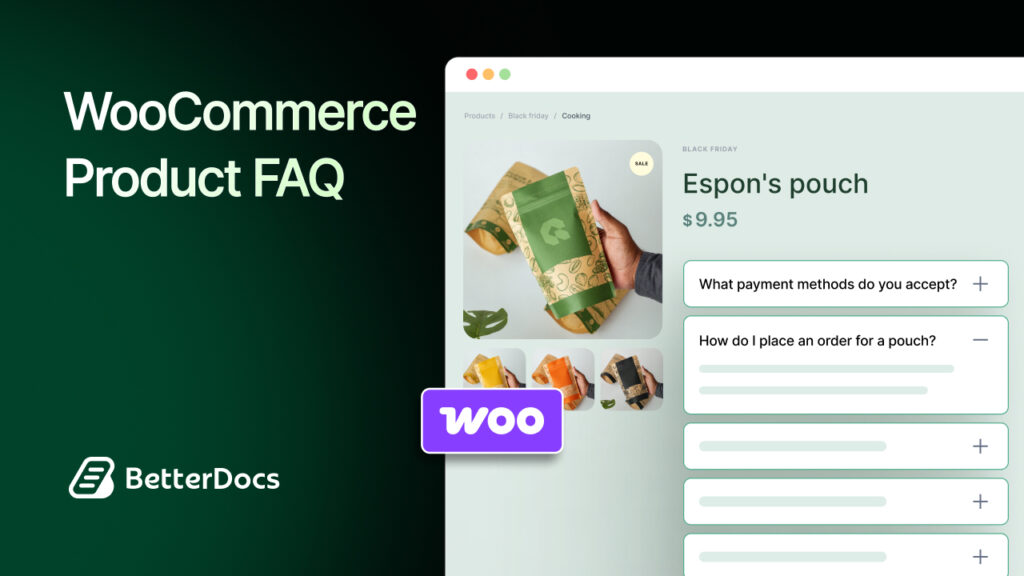
A well-placed WooCommerce Product FAQ can do much more than answer basic questions. It can remove hesitation, build trust, and help shoppers move from browsing to buying without leaving the product page. For growing online stores, that makes a strong WooCommerce FAQ strategy more than a nice add-on; it becomes a practical conversion tool.
That is exactly where BetterDocs steps in with its new feature for WooCommerce stores. Instead of showing generic answers everywhere, you can create organized, product-specific FAQs, display them where they matter most, and even speed up content creation with AI. The result is a smoother shopping experience and a smarter way to handle WooCommerce customer queries.
TL;DR
If you want the short version before diving in, here is what this feature brings to the table.
| Topic | Quick Take |
| Feature | BetterDocs now lets you create a dedicated Product FAQ for WooCommerce using its FAQ Builder |
| Main Benefit | Answer customer questions directly on product pages to reduce friction and improve buying confidence |
| Organization | Create FAQ Groups by product or topic such as shipping, sizing, or returns |
| Content Creation | Add FAQs manually or generate them faster with AI |
| Display Control | Show FAQs in Product Tab, Before Product Summary, or After Product Summary |
| Design Options | Choose from Modern, Classic, and Abstract layouts |
| SEO Value | Enable FAQ schema so search engines can better understand your content |
| Best For | Stores that want to handle repetitive customer questions without increasing support workload |
What Is WooCommerce Product FAQ?
A WooCommerce Product FAQ is a dedicated question-and-answer section added to a product page to help shoppers understand the product before they buy. Instead of making customers search through long descriptions or contact support, the FAQ places useful answers exactly where purchase decisions happen. In simple terms, it is one of the most effective ways to make product information clearer and more accessible.
For example, if you sell sneakers, you can create one FAQ group covering sizing, materials and exchange policy for that product line, while another group can focus on shipping and care instructions for jackets. That makes each Product FAQ more relevant and more helpful to the shopper.
Why Do WooCommerce Stores Need a Product FAQ?
A product page should not leave customers guessing. When buyers have unanswered questions about sizing, delivery, compatibility, or returns, they often delay the purchase or leave altogether. A strong WooCommerce FAQ closes those information gaps at the right time and helps stores create a more confident buying journey.
Reduce Repetitive Pre-Sale Questions
Many WooCommerce stores answer the same questions every day: “What is the delivery time?”, “Does this come in other sizes?”, or “Can I exchange it later?” A product FAQ helps answer these upfront. For example, a fashion store can address size-fit concerns directly on the product page instead of handling the same query in live chat all day.
Remove Friction at the Point of Purchase
Customers tend to make decisions quickly, especially on product pages. If key details are missing, uncertainty takes over. A skincare store, for instance, can use an FAQ to answer whether a product suits sensitive skin, helping shoppers decide without leaving the page to search elsewhere.
Build Trust Through Transparency
Clear answers create credibility. When a store openly addresses shipping rules, warranty terms, or product usage, customers feel more secure about placing an order. A gadget store that explains battery life, replacement policy and box contents in an FAQ appears more reliable than one that leaves buyers to guess.
Keep Information Relevant
Not every question belongs on every page. A store selling electronics, apparel and accessories needs different answers for different categories. Product-specific FAQ Groups let you show only the most relevant questions, so the information feels curated rather than cluttered.
Support Discoverability with Structured Content
FAQs also have search value when paired with schema markup. If your store answers common buying questions in a structured way, search engines can better understand the page. That means a store selling office chairs, for example, can make it easier for people searching “Does this chair need assembly?” to find the right product faster.
Introducing BetterDocs FAQ for WooCommerce Store
BetterDocs brings a refreshing approach to WooCommerce customer queries by making FAQs easier to build, easier to organize, and easier to display. Instead of forcing store owners to rely on one generic FAQ block for everything, it gives you a dedicated WooCommerce workflow inside the FAQ Builder so each product can have its own focused set of answers.
What makes this especially exciting is the flexibility. You can create FAQ Groups, assign them to categories and specific products, add custom icons, write answers manually for brand precision, or use AI to generate them faster. Then, you can choose where the FAQs appear on the product page, select a layout that matches your design and even enable FAQ schema for added search visibility. It feels less like a basic add-on and more like a conversion-focused upgrade for product pages.
How to Add Product FAQ in WooCommerce Store?
Once you see the value of a Product FAQ for WooCommerce, the next step is bringing it live on your store. The good news is that BetterDocs keeps the setup process simple, so you can move from idea to implementation without turning it into a technical project.
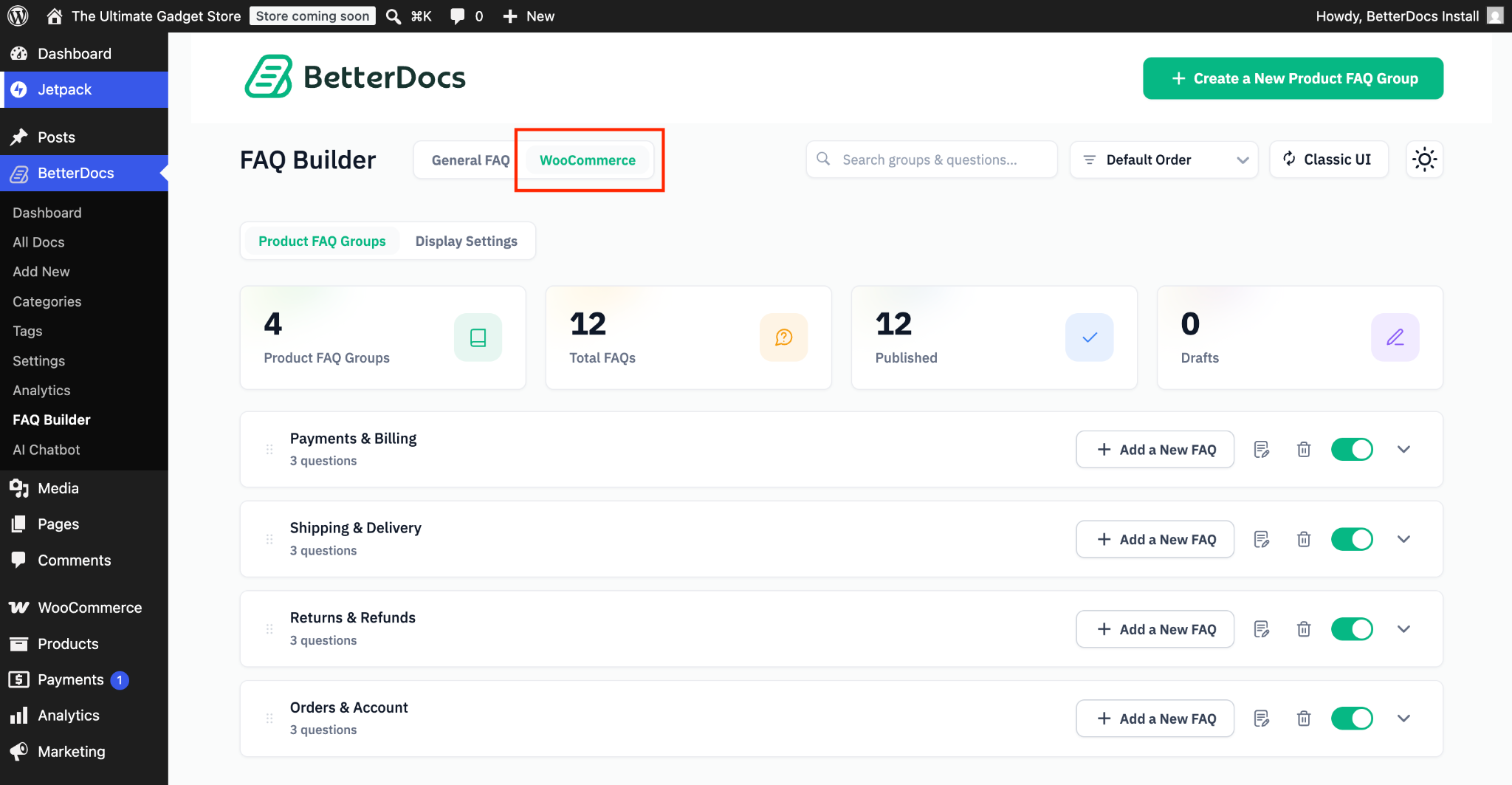
Before you begin, make sure both BetterDocs and WooCommerce are active on your WordPress site. Once that is in place, head over to BetterDocs → FAQ Builder from your WordPress dashboard and open the dedicated WooCommerce tab.
Step 1: Open the WooCommerce FAQ Workspace
Inside the FAQ Builder, select the WooCommerce tab to access the area built specifically for store FAQs. Think of this as the place where you shape answers around the buying journey, not just general support content.
Step 2: Create FAQ Groups for Your Products
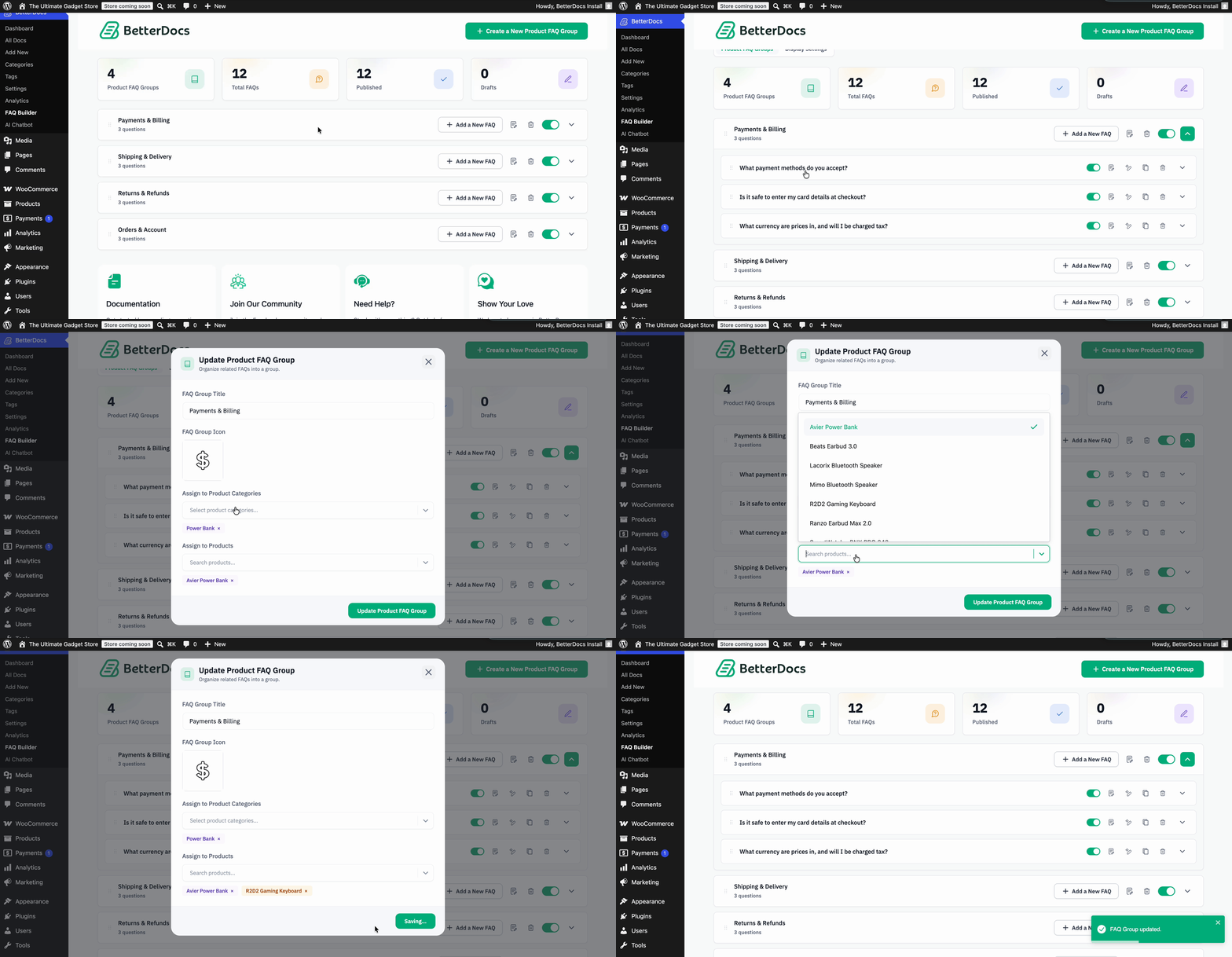
Next, add an FAQ Group. This group acts like a container for related questions, so you can organize them by product, topic, or category. For instance, you might create one group for “Shipping & Delivery”, then assign those to the products where they are most relevant. BetterDocs also lets you name the group clearly, upload an icon, select the category, and choose the specific products where it should appear.
Step 3: Add Questions Manually or Generate with AI
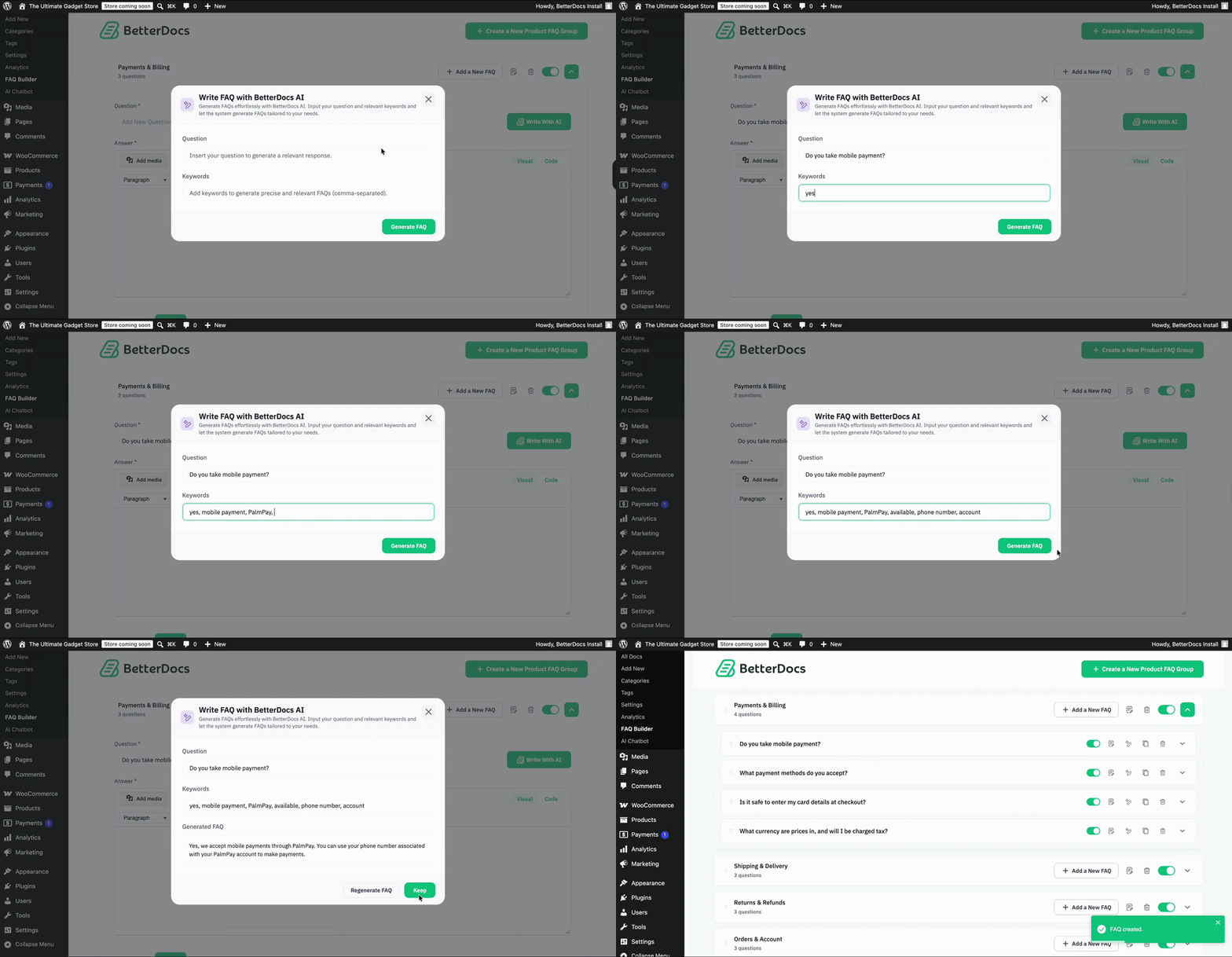
Once the group is ready, start filling it with questions and answers. If you want full control over wording and tone, add them manually.
If you want speed, use the Write with AI option to generate answer pairs and then refine them as needed. This is especially helpful for stores managing large product catalogs, where creating every FAQ from scratch can take a lot of time. BetterDocs also gives you a Regenerate FAQ option, so you can keep improving the output until it matches your brand voice.
Step 4: Customize how the FAQs Appear
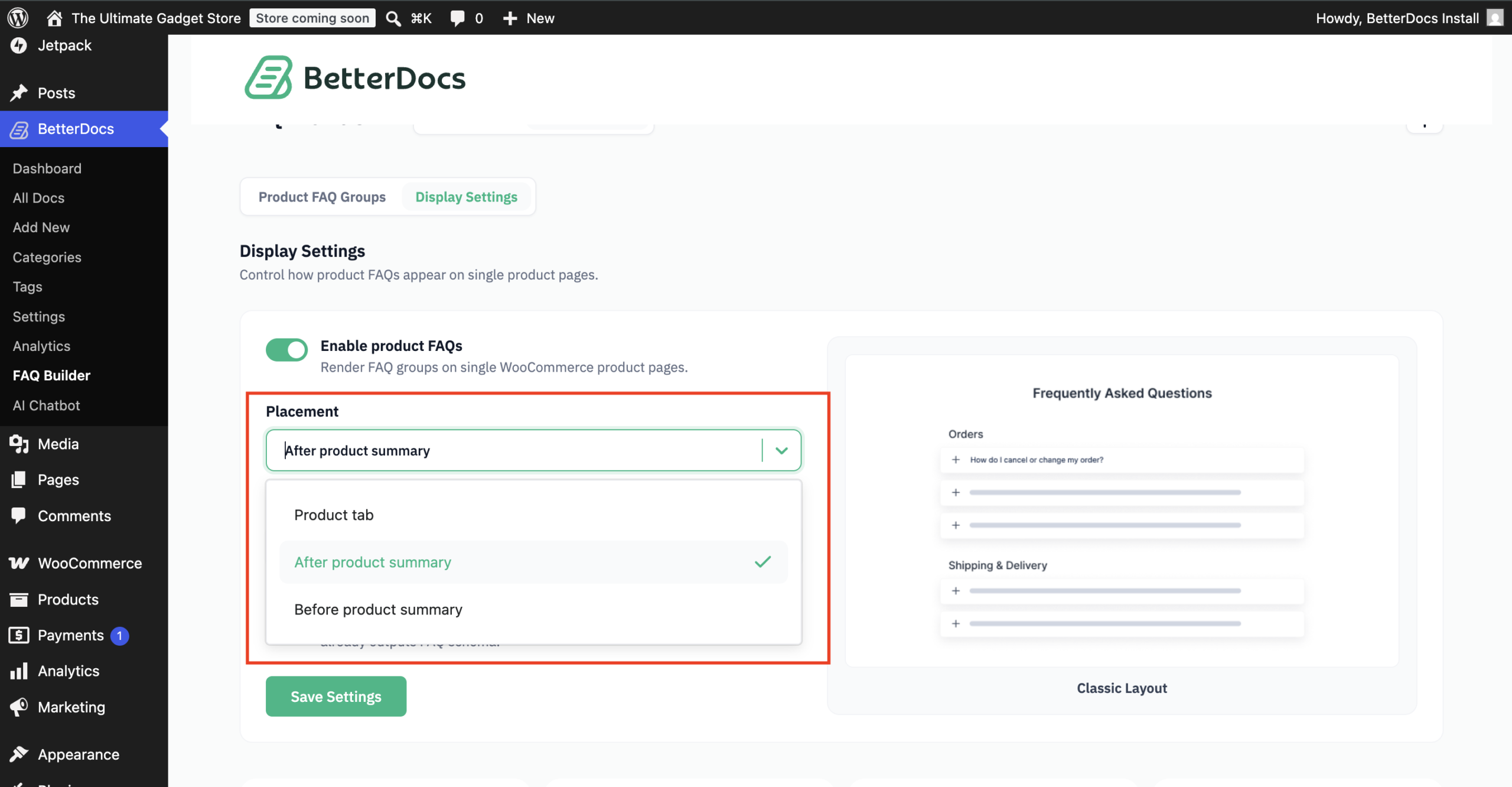
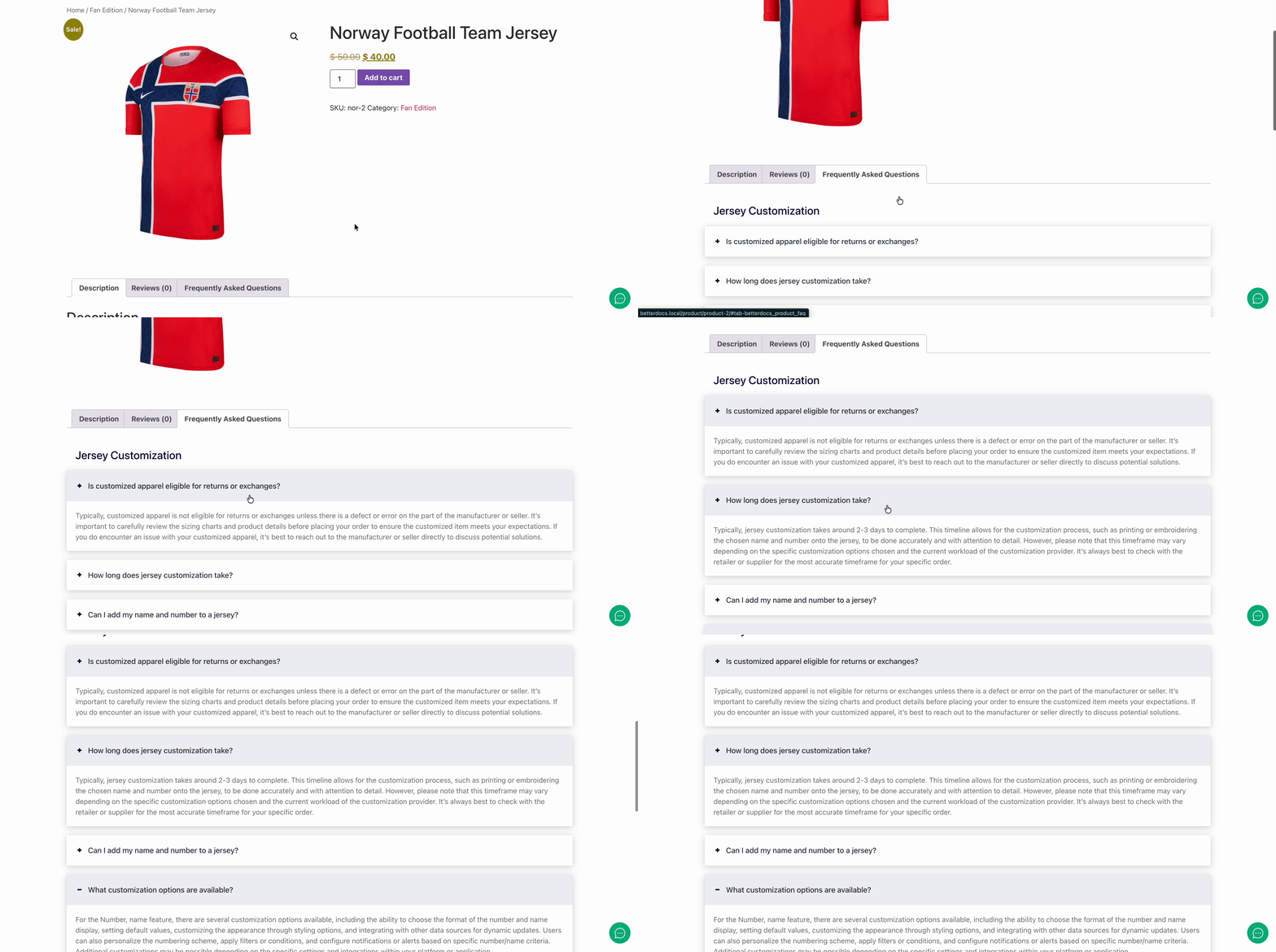
After your content is ready, switch to Display Settings. This is where BetterDocs becomes highly practical for storefront experience. You can place the FAQ in the Product Tab, Before Product Summary, or After Product Summary, depending on how your product page is structured and where customers are most likely to look for quick answers.
Step 5: Choose the Title, Layout And Schema Option
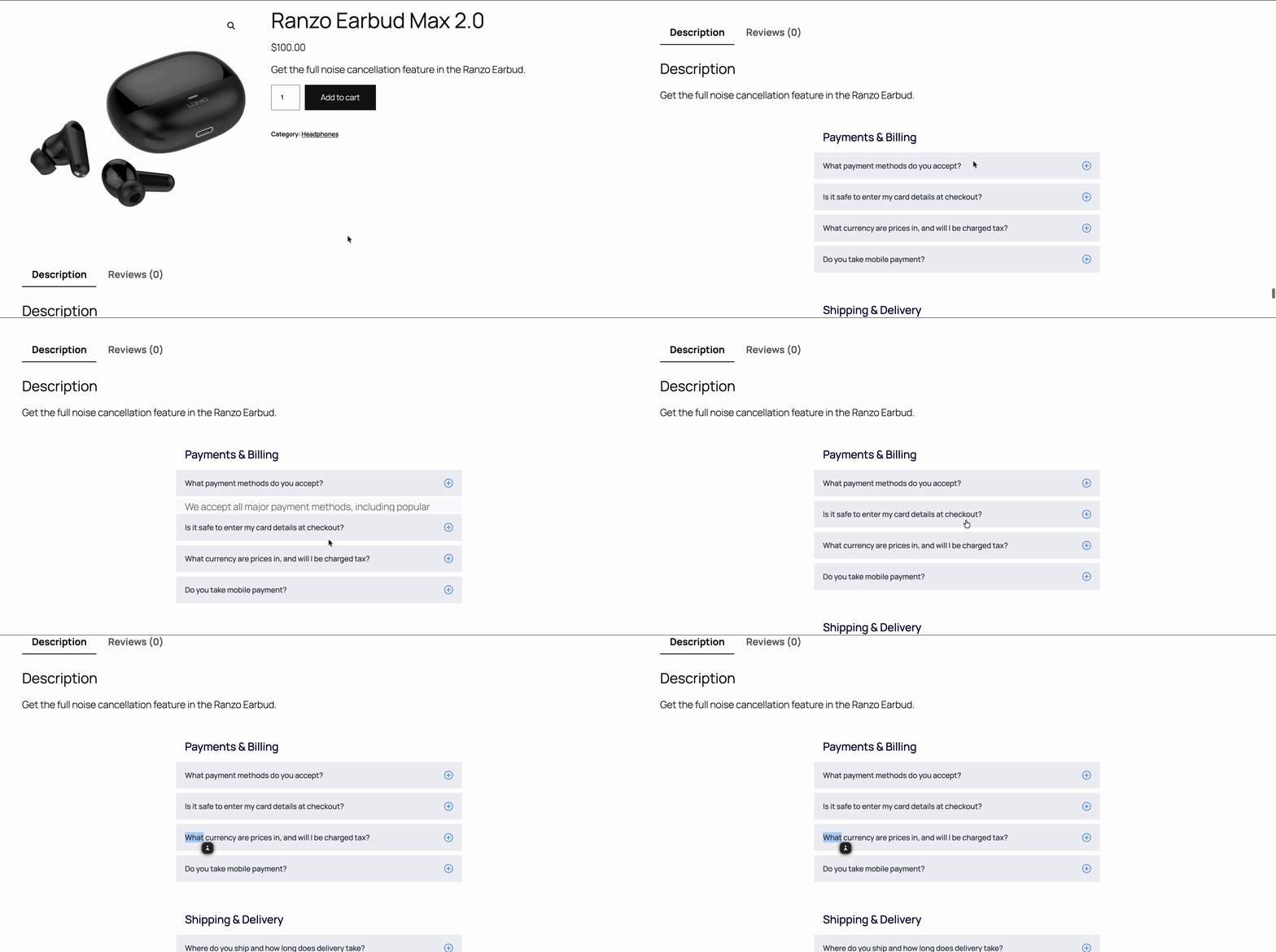
Now give the section a title such as “Frequently Asked Questions” or “Product FAQs,” then choose the layout that fits your brand. BetterDocs offers Modern, Classic, and Abstract layouts, so your FAQ does not feel visually disconnected from the rest of the product page. You can also toggle Output FAQ Schema on or off, depending on whether you want structured data applied for search engines.
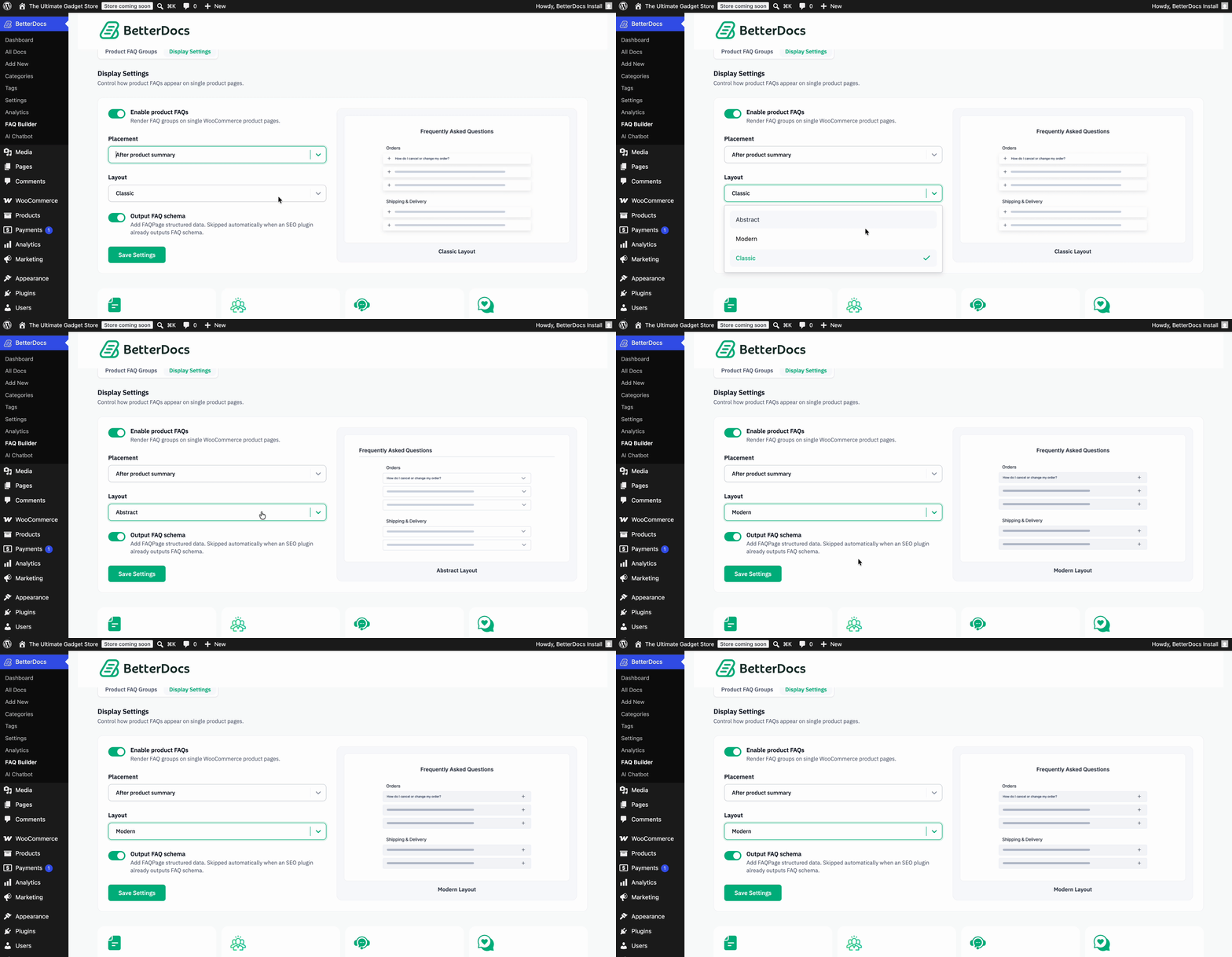
Once everything looks right, save the settings and your WooCommerce Product FAQ is ready to go live. If you want a closer walkthrough before implementing it on your site, it is worth checking the documentation for full setup details and visuals.
Best Practices to Follow while Implementing FAQ on WooCommerce Store
Adding FAQs is only the first step. To get real value from them, you need to make sure they are useful, relevant, and aligned with the buying experience. The best-performing FAQs do not just fill space; they remove hesitation and guide shoppers toward action.
Group FAQs by Actual Buying Intent
Avoid mixing unrelated questions into one block. Use BetterDocs FAQ Groups to separate themes such as shipping, sizing, warranty, or product use. For example, a furniture store could show assembly-related questions only for products that require setup, rather than across the entire catalog.
Use AI for speed, then refine for brand voice
AI can help you generate FAQs faster, especially when you are launching multiple products at once. But the strongest results come when you edit those answers with your own brand language. A beauty brand, for example, might use AI to draft ingredient-related responses, then refine the tone to sound warmer and more customer-friendly.
Place FAQs Where Shoppers Naturally Pause
FAQ placement matters more than many store owners realize. If customers often hesitate before comparing key details, showing the FAQ before Product Summary can help. If they usually scroll for more information after reading the description, After Product Summary may work better. BetterDocs gives you the flexibility to test what matches your sales flow best.
Choose a Layout That Supports Readability
A great FAQ should feel like part of the product page, not an afterthought. Use the Modern, Classic, or Abstract layouts based on your storefront style. For instance, a minimalist fashion brand may prefer a cleaner layout, while a tech-heavy store might want a more structured display for detailed product explanations.
Turn on FAQ Schema When the Content Is Truly Useful
Schema works best when your FAQs answer real customer questions clearly and directly. Do not add filler just to check an SEO box. If you sell subscription boxes, for example, schema becomes more valuable when the FAQ answers practical questions like billing cycles, renewal timing, and cancellation rules in a concise way. BetterDocs makes enabling this option simple through the display settings.
Turn Product Questions Into More Conversions
A well-built WooCommerce Product FAQ does more than organize answers. It helps customers feel informed, reassured, and ready to buy. That is why BetterDocs’ new WooCommerce feature stands out: it combines ease of use, flexible display options, AI-powered content support, and product-specific organization in one streamlined workflow.
If your store is dealing with repeated pre-sale questions or product pages that need more clarity, this is a smart feature to start using now. Set up your first FAQ group, tailor it to your products, and turn those everyday customer concerns into a smoother path to conversion.
Was this blog helpful for your WooCommerce store? Let us know which WooCommerce feature you want to see in our Facebook Community. Do not forget to subscribe to our blog for the latest feature updates and guides.
Domande frequenti
What is BetterDocs WooCommerce Product FAQ?
It is a feature inside BetterDocs that allows WooCommerce store owners to create and display product-specific FAQs on their product pages. You can organize questions into FAQ Groups, assign them to products, and control how they appear.
Can I add FAQs to specific WooCommerce products only?
Yes. BetterDocs allows you to assign FAQ Groups to specific products, which means you can show only the most relevant questions on each product page rather than using the same FAQ everywhere.
Does BetterDocs let me create FAQs with AI?
Yes. You can add FAQs manually or use the Write with AI option to generate question-answer content faster. You can also regenerate the AI output if you want a better variation.
Where can I display the FAQ on a WooCommerce product page?
BetterDocs lets you place the FAQ in three locations: Product Tab, Before Product Summary, or After Product Summary. This gives you flexibility to match the FAQ placement with your store layout and customer journey.
Does this feature support FAQ schema?
Yes. BetterDocs includes an Output FAQ Schema toggle in the display settings, allowing you to enable or disable FAQ schema markup based on your SEO needs.