If you are researching BetterDocs vs. Heroic Knowledge Base, you are likely trying to choose the best WordPress knowledge base plugin for customer support, product documentation, or even an internal wiki. That is a smart comparison to make, because both plugins are built for self-service support, but they take very different approaches: BetterDocs leans heavily into AI-powered documentation, modern UX and flexible layouts, while Heroic Knowledge Base focuses on a more traditional, self-hosted support workflow with strong reporting and access control.
This guide compares both plugins in depth using their official feature pages, documentation, pricing pages and product materials. You will get a practical look at features, AI capabilities, customization, internal knowledge base support, analytics, integrations and real-world value so you can decide which plugin is the better long-term fit for your site.
TL;DR
Too long? Did not read? Here’s the quick summary.
| Decision Area | Better Choice | Why It Wins |
| Best overall modern solution | BetterDocs | Stronger AI stack, more modern UI, Elementor/Gutenberg/FSE flexibility, internal docs, instant answers and AI chatbot options |
| Best for classic self-hosted support | Heroic Knowledge Base | Clean traditional KB workflow, strong reporting, user restrictions and help desk-oriented transfers |
| Best free starting point | BetterDocs | Free plugin version on WordPress.org plus upgrade path to PRO |
| Best for AI-powered documentation | BetterDocs | AI writing, AI summarization, AI search, AI quality analysis and AI chatbot are built into its product direction |
| Best for internal wiki | Tie, slight edge to BetterDocs | Both support private/internal setups, but BetterDocs makes internal documentation a more visible core use case |
| Best if you want affordable pricing tiers | BetterDocs | HeroThemes publishes clear annual plan breakdowns; BetterDocs highlights starter/add-on/bundle pricing more than a simple matrix |
Why Choosing the Right Knowledge Base Plugin Matters
A knowledge base is no longer just a “nice to have” support add-on. For many SaaS companies, WooCommerce stores, agencies and product-led businesses, it is the front line of customer support, onboarding and retention.
A strong WordPress documentation plugin reduces repetitive tickets, improves product adoption and gives users answers when they want them: immediately. BetterDocs explicitly positions its knowledge base as a way to reduce support by up to 20%, while Heroic KB frames its tools around self-hosted customer support and scalable self-service workflows.
Faster Self-Service Support
When customers can search, browse and solve issues on their own, your support team gets fewer basic questions. BetterDocs emphasizes instant answers, advanced search and AI chatbot for faster self-service support; Heroic KB emphasizes live search, transfers and search analytics to help users find answers before opening a ticket.
Better Onboarding And Product Adoption
A documentation center is not only for troubleshooting. It also helps new customers, employees and partners learn how to use your product. HeroThemes’ testimonials repeatedly mention onboarding teams and preserving internal knowledge, while BetterDocs highlights internal documentation, multiple knowledge bases and guided content structures for different products or audiences.
Lower Support Costs
The best knowledge base plugin for WordPress is the one that scales without forcing your team into extra manual work. BetterDocs pushes this forward with AI writing, AI doc summarization, AI quality analysis and AI search, while Heroic KB offers reporting, feedback tracking and search intelligence that help teams improve content over time.
Stronger SEO And Discoverability
A public documentation hub can capture long-tail search traffic, especially for how-to queries, troubleshooting terms and comparison keywords. HeroThemes explicitly highlights SEO benefits from hosting the KB on your main domain and BetterDocs supports structured, searchable documentation with live search, templates and multilingual options.
Internal Knowledge Sharing for Teams
Support documentation is only one side of the story. Many organizations also want an internal knowledge base WordPress setup for employee training, SOPs, policies, or sales enablement. Both tools support internal use cases, but BetterDocs gives role-based internal knowledge base controls more front-and-center visibility in its core product story.
About BetterDocs
BetterDocs is a WordPress documentation and knowledge base plugin built by WPDeveloper. It is designed to help businesses create public help centers, FAQs, wikis, glossaries, multiple knowledge bases and private internal documentation. On its official site, BetterDocs highlights AI writing, AI chatbot support, AI summarization, AI doc quality analysis, instant answers, analytics, Git sync, multilingual documentation and builder compatibility with Elementor and Gutenberg.
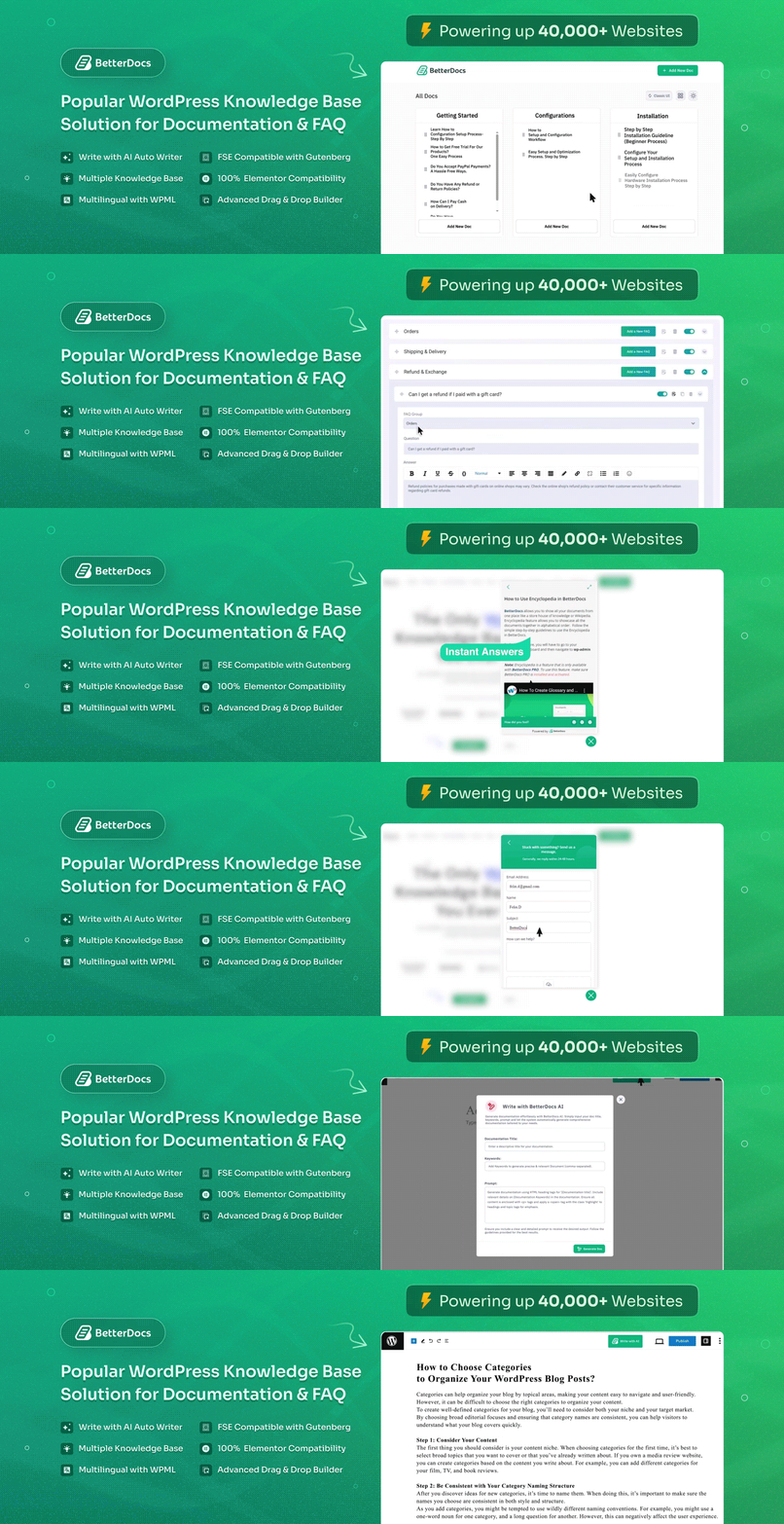
What makes BetterDocs stand out in this comparison is that it does not feel like a simple documentation plugin. It feels like a broader AI knowledge base plugin platform for WordPress. Instead of treating AI as an afterthought or secondary feature, BetterDocs uses AI across content creation, search, answer delivery and content optimization. That makes it particularly compelling for brands that want a more modern, proactive self-service support system rather than a static article library.
BetterDocs also has strong ecosystem positioning. It supports WordPress-native editing patterns, works with Elementor and Gutenberg, offers a free plugin and promotes use cases ranging from SaaS documentation to WooCommerce self-service help centers and internal team knowledge management.
Key Takeaways
- BetterDocs is more than a documentation plugin; it is a modern knowledge base solution for WordPress.
- Its biggest advantage is how deeply AI is woven into the product.
- It is a strong fit for SaaS, WooCommerce, agencies, product teams and internal wikis.
- It is also the easier starting point for budget-conscious users because it has a free public version.
About Heroic Knowledge Base
Heroic Knowledge Base is a self-hosted WordPress knowledge base solution from HeroThemes. It focuses on searchable help content, article feedback, analytics, internal/external access control and support deflection. HeroThemes positions its suite as self-hosted customer support tools, with data staying on your own server and unlimited users across plans.
Heroic KB leans toward a more traditional approach. It is built around article management, live search, feedback loops, email reports, transfers to help desks or contact forms and clean integration into a WordPress site. That makes it attractive for companies that want a no-nonsense customer support documentation system without leaning as heavily into experimental or advanced AI workflows.
That said, HeroThemes has added modern capabilities too. Its pricing page now highlights a Heroic AI Assistant in higher-tier plans, plus integrations with Slack, HelpScout, WPForms, Gravity Forms, Formidable Forms, WooCommerce, Easy Digital Downloads and Heroic Inbox. So while Heroic KB is more classic in spirit, it is not stuck in the past. It is just less AI-centric than BetterDocs overall.
Key Takeaways
- Heroic KB is a mature, self-hosted knowledge base system for WordPress.
- It prioritizes search, reporting, feedback and support deflection.
- AI exists, but it is less central to the product identity than with BetterDocs.
- It is better suited to teams that prefer a classic support-ops setup.
Who This Comparison Is for?
This comparison is for several types of buyers:
- Beginners looking for the best knowledge base plugin for WordPress
- Businesses comparing a BetterDocs alternative
- SaaS teams building self-service support
- WooCommerce stores are creating product help centers
- Agencies choosing a reusable client documentation stack
- Teams building an internal wiki, WordPress or a private employee help center
- Advanced users who care about analytics, search data and integrations.
BetterDocs vs Heroic Knowledge Base: Quick Comparison Table
In this part, let us have a glance at the feature and pricing comparison of the BetterDocs and Heroic Knowledge Base plugin.
Features Comparison:
Here is a detailed feature comparison overview between BetterDocs and Heroic Knowledge Base for better understanding.
| Category | BetterDocs | Heroic Knowledge Base |
| Core positioning | AI-powered WordPress knowledge base and documentation platform | Self-hosted WordPress knowledge base and support deflection tool |
| AI features | AI writing, AI summarizer, AI chatbot, AI search, AI doc quality analysis | Heroic AI Assistant in the higher plan tier |
| Builders | Elementor, Gutenberg, FSE | Standard WordPress workflow, theme/template customization |
| Internal knowledge base | Yes, with role-based restrictions | Yes, with internal/external site support and user restriction |
| Search | Advanced live search, instant answer, AI modal search | Live search, popular/failed search reporting |
| Analytics | Views, reactions, searches, leading docs/categories, multiple KB analytics, email reporting | Dashboard, feedback, search, transfers, conversations |
| Multiple knowledge bases | Yes | Not positioned as a primary core feature |
| Git sync | Yes, GitHub/ GitLab | Not highlighted |
| Free version | Yes | No public free plugin tier highlighted |
| Overall feel | More modern and feature-rich | More traditional and support operations-oriented |
Pricing Comparison:
Now, let’s take a glimpse at how the pricing looks for both of these plugins. Find the best and most affordable solution for your business here.
| Pricing Snapshot | BetterDocs | Heroic Knowledge Base |
| Entry point | BetterDocs Pro is starting from $69 billed yearly; the AI Chatbot add-on is also shown at 8.99/month. | Heroic Bundle Essential: $169/year intro pricing |
| Free option | Yes, a free plugin is available | No free version highlighted on the pricing page |
| Pricing clarity | More promotion/bundle-driven | More transparent plan matrix |
| Pricing Breakdown | BetterDocs Pro is promoted from $69 billed yearly and the separate AI Chatbot add-on is shown at $8.99/month. Starter: $69/ year Innovator: $149/ year Visionary: $299/ year | Heroic Bundle Essential — $169/year Heroic Bundle Plus — $349/year Heroic Bundle Pro — $599/year |
BetterDocs Features Breakdown
Since we already have some ideas on what some of the core features of BetterDocs are. In this part, let’s have a detailed look at each of these features and how it works.
AI-Powered Documentation Features
BetterDocs is clearly built for the current wave of AI-powered knowledge bases and self-service support trends. Instead of limiting AI to a chatbot, it spreads AI across content creation, content quality, search and response delivery. For companies that want faster documentation workflows, that is a meaningful advantage over older documentation plugin models.
AI Writing Assistance
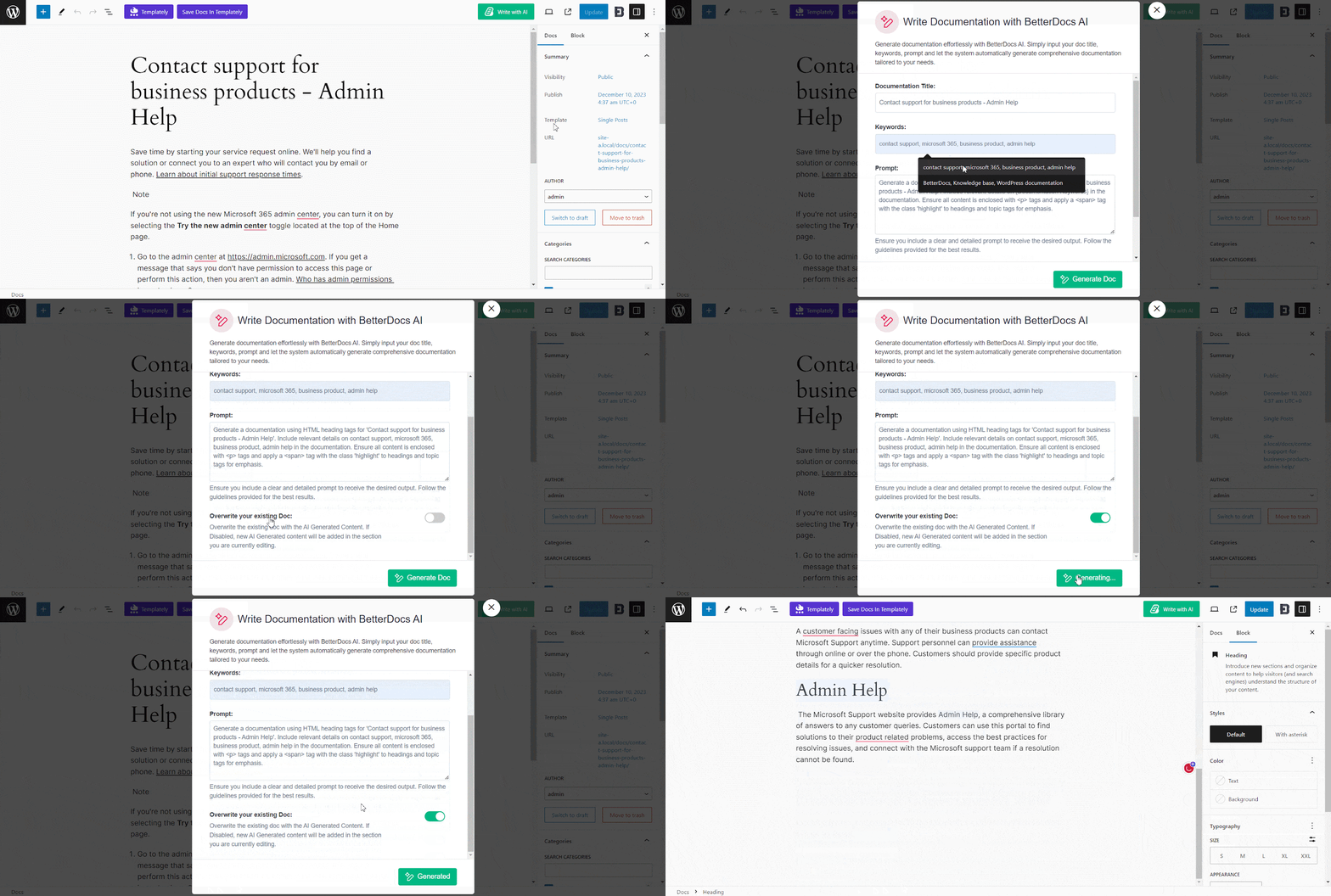
The Write With AI feature lets users generate documentation and FAQs directly from the WordPress dashboard using OpenAI integration. BetterDocs also describes workflow benefits like first-draft generation, tone control, grammar improvement and quick article structure generation from prompts or keywords. This makes BetterDocs especially attractive for lean support teams that need to publish faster without sacrificing consistency.
Instant Answers
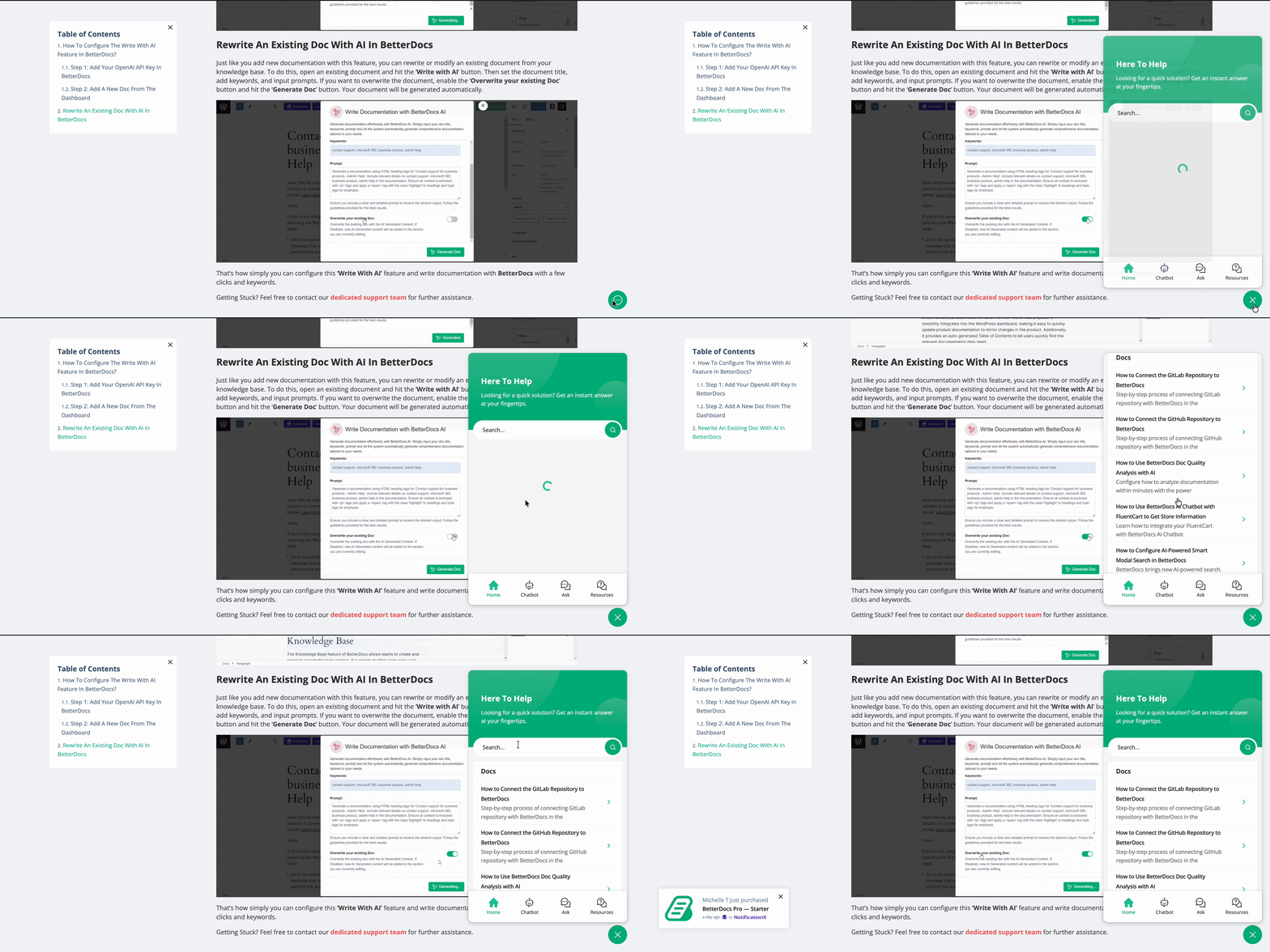
BetterDocs Pro includes Instant Answer, a support bar that helps visitors search for articles instantly and even leave feedback or contact support. This is important because modern self-service support is shifting from static navigation toward conversational or semi-conversational answer discovery. BetterDocs embraces that shift well.
AI Search Experience
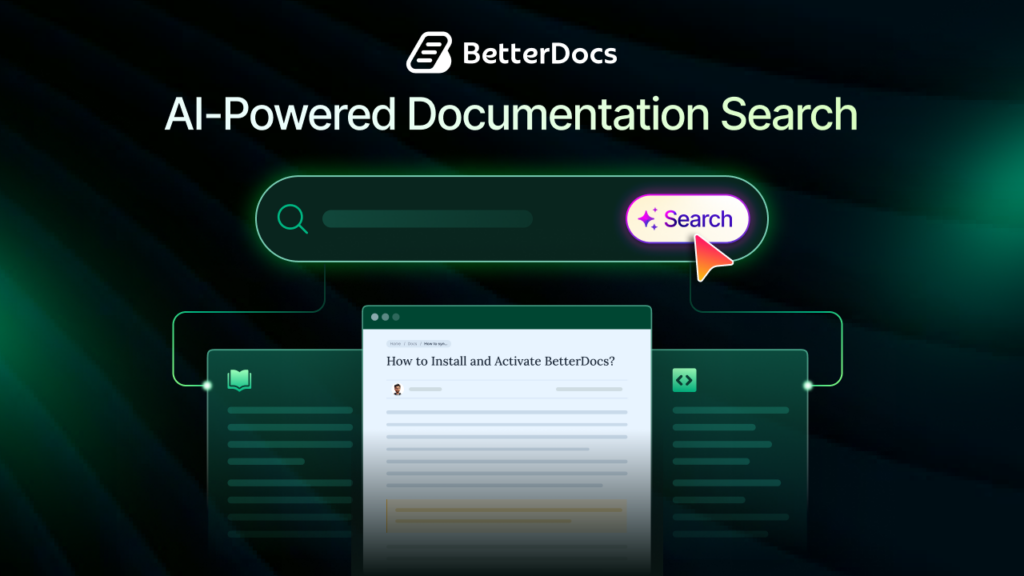
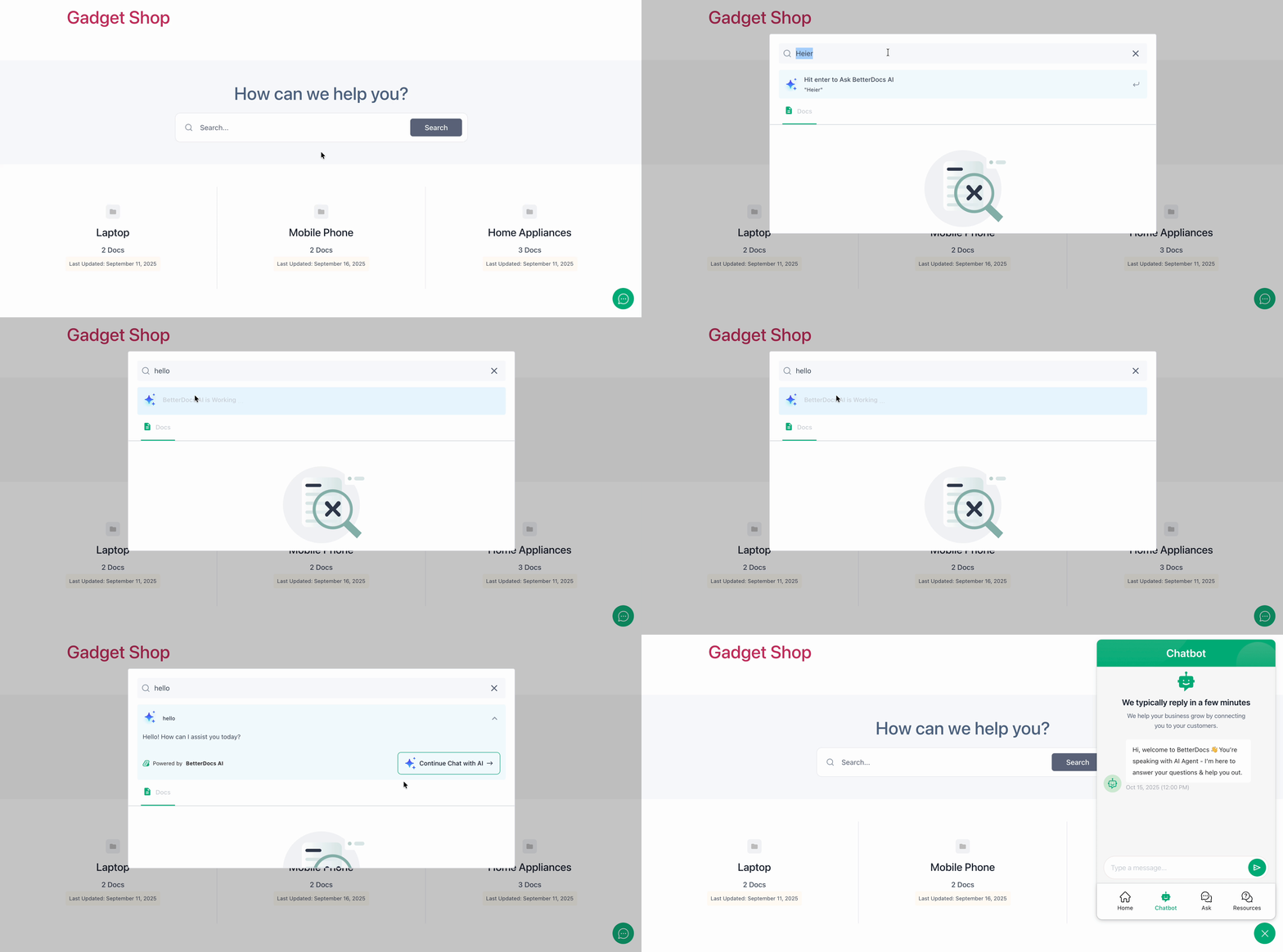
BetterDocs also offers AI-Powered Smart Modal Search, which can generate instant AI answers inside search and let users continue into the chatbot. That is a major differentiator in the documentation plugin comparison conversation because it turns search into a guided answer experience, not just a list of article titles.
Knowledge Base Customization
One of the core parts of a WordPress knowledge base plugin is the customization option. With flexible customization, any business can make its knowledge base based on its business niche. Let us have a look at some of the customization features here.
Ready Templates
BetterDocs offers ready-made templates for documentation pages and single docs, which is useful for teams that want to launch quickly without heavy development work. BetterDocs repeatedly markets these layouts as modern, visually polished and compatible with both Gutenberg and Elementor.
Advanced Layout Controls
Beyond templates, BetterDocs supports drag-and-drop organization, multiple layouts, sticky table of contents, archive customization and FSE compatibility. That level of layout control makes it easier to create documentation that actually matches the rest of your brand.
Gutenberg Compatibility
BetterDocs works with Gutenberg and full-site editing, with blocks and patterns for documentation design. That is a practical win for users who prefer native WordPress editing over theme-locked customization.
Internal Knowledge Base Features
Some organizations need private document management to restrict access to the document. Here, BetterDocs stands out for internal knowledge sharing. Here are some of the core features.
Role-Based Access
BetterDocs Pro lets admins restrict access by logged-in status or by specific user roles, including subscribers, editors, authors, administrators and more. That is a strong fit for private training docs, partner resources, or internal SOP libraries.
Private Documentation
Admins can restrict all doc archives, selected docs, categories, or entire knowledge bases. BetterDocs also supports redirect URLs so unauthorized users do not land on broken experiences. That is a thoughtful feature for internal documentation rollouts.
Team Collaboration Benefits
Because BetterDocs supports multiple knowledge bases, internal role restrictions, Git sync and AI-assisted content creation, it works well for cross-functional teams such as support, product, engineering and marketing. In other words, it behaves more like a modern documentation workspace than a simple FAQ page builder.
Analytics & Reporting
Another important feature of a knowledge base plugin is the analytics. How your documentation is performing proves whether your customers are getting actual support or not. Here are some of the key analytics features that you will find inside BetterDocs.
User Behavior Tracking
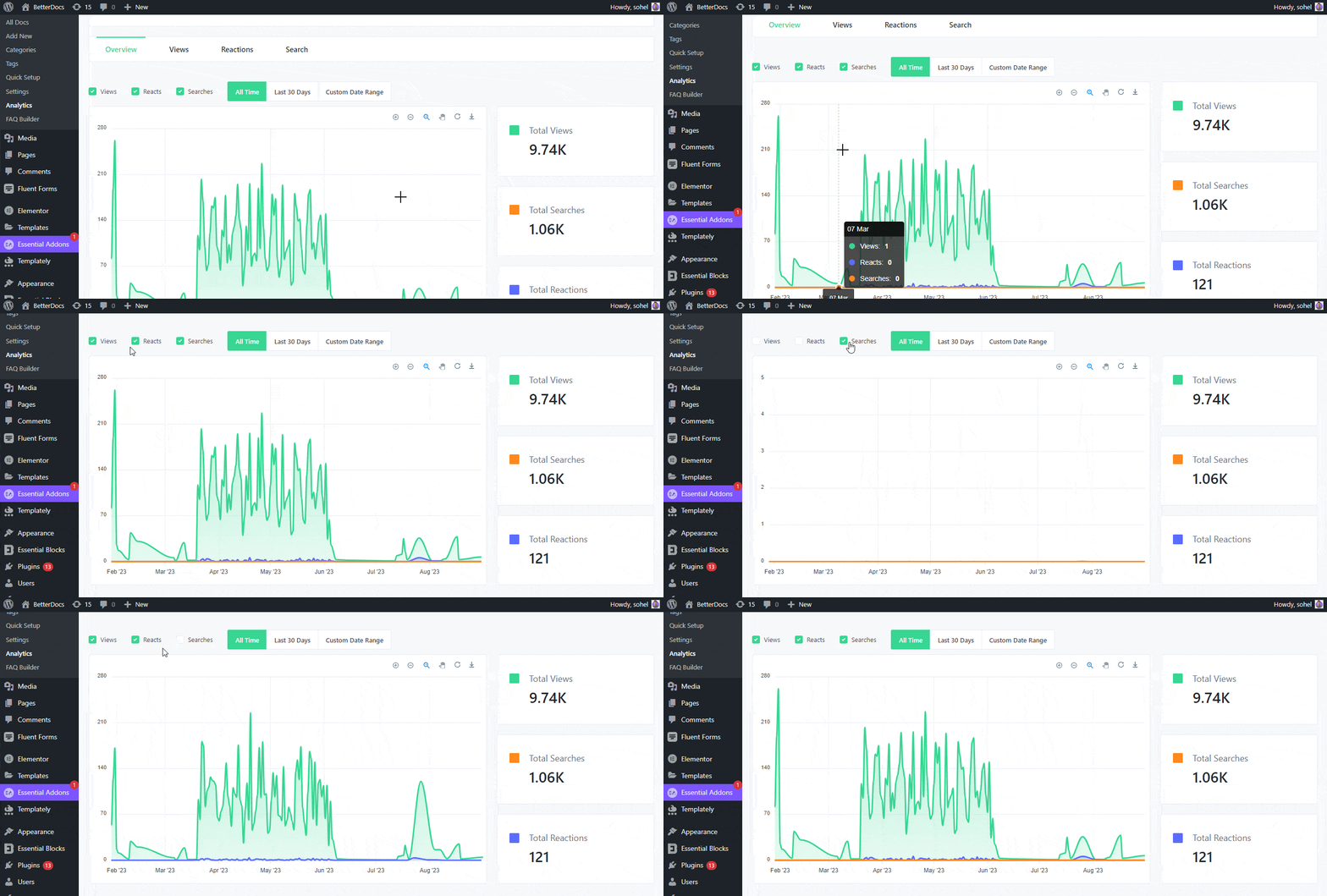
BetterDocs Analytics tracks views, reactions, leading docs, leading categories and time-based performance ranges. This gives teams a clear read on what content people use and which documents actually help.
Search Analytics
BetterDocs surfaces total searches, successful result searches, no-result searches, popular keywords and no-result keywords. That makes it easier to identify documentation gaps, which is essential if you are serious about improving self-service support.
Performance Monitoring
BetterDocs also supports email reporting and multiple knowledge base analytics comparisons. That is useful for growing businesses running product-specific help centers or regional support libraries.
BetterDocs Pros And Cons
Pros
- Strongest AI documentation feature set in this comparison
- Modern UI and template system
- Excellent Elementor and Gutenberg support
- Free version available
- Multiple knowledge bases and internal documentation support
- Search analytics plus content-quality tooling
- GitHub/GitLab sync for documentation workflows
Cons
- Some advanced AI features require OpenAI setup and/or separate add-ons
- Some advanced features require PRO dependency.
Heroic Knowledge Base Features Breakdown
Now, let us have a detailed look at some of the key features of Heroic Knowledge Base.
Knowledge Base Creation Features
Heroic KB provides setup assistance, article management, categories, tags, attachments, custom ordering, widgets, FAQ builder, glossary builder, CSV import and a dedicated KB theme. It is clearly built for teams that want a complete self-hosted documentation system inside WordPress without relying on external hosted help-center platforms.
Search & Navigation Features
Search is one of Heroic KB’s core strengths. The plugin documentation highlights live search and the analytics system tracks popular searches, failed searches and search effectiveness. Testimonials on the product page also emphasize type-ahead search, sub-categories and sidebar navigation.
User Feedback & Voting System
Heroic KB includes article usefulness voting and admin controls for deleting, recalculating and reviewing feedback. Its analytics section has a dedicated Feedback tab that breaks down positive versus negative ratings and written comments. That makes it strong for iterative content improvement.
Design & Styling Options
Heroic KB supports theme styling, template customization, widgets, sidebars and a dedicated knowledge base theme. Compared with BetterDocs, though, the design story feels more traditional and less builder-centric. It is capable, but not as obviously modern or as visually flexible as BetterDocs’ Elementor and Gutenberg-first approach.
Reporting & Analytics
This is one of Heroic KB’s best areas. Its analytics dashboard includes tabs for Dashboard, Feedback, Search, Transfers and Conversations. It also supports time filters, transfer tracking, failed search analysis and AI conversation transcript review. For support managers, that is genuinely useful.
Heroic Knowledge Base Pros And Cons
Pros
- Clear self-hosted support model
- Strong analytics and transfer reporting
- Good access control for public, password-protected, or internal use
- Straightforward plan structure
- Helpful form/help desk integrations
Cons
- No free version
- Less AI-forward than BetterDocs
- Design customization feels more classic than modern builder-first
- Fewer signals of advanced content-creation automation
BetterDocs vs Heroic Knowledge Base: Detailed Feature Comparison
Here is a more detailed breakdown of the feature based on different areas:
| Type | Area | BetterDocs | Heroic Knowledge Base |
| Ease of Use | Beginner experience | Strong visual layouts and guided features | Clean WordPress-style workflow |
| Learning curve | Slightly broader because of more features | Simpler if you want a classic setup | |
| Setup & Onboarding | Setup style | Install, create docs, use templates/builders | Setup assistant, sample content, plugin/theme flow |
| Onboarding help | Strong docs and guided feature pages | Strong plugin documentation and setup assistant | |
| AI Features Comparison | AI writing | Yes | Not highlighted as core |
| AI summaries | Yes | Not highlighted | |
| AI search | Yes | AI assistant is available in the higher plan | |
| AI chatbot | Yes | Heroic AI Assistant in Pro bundle | |
| Search Functionality | Live search | Yes | Yes |
| Instant answer experience | Yes | Less emphasized | |
| Failed/popular search reporting | Yes | Yes | |
| Customization Flexibility | Page builders | Elementor, Gutenberg, FSE | Theme/template/CSS approach |
| Ready templates | Yes | Dedicated KB theme, but less builder-led | |
| Analytics & Reporting | Views/reactions/search | Yes | Yes |
| Transfers/help desk escalation | Not highlighted as deeply | Yes | |
| AI conversation analytics | Not primary | Yes | |
| Internal Documentation Features | Role-based restrictions | Yes | Yes |
| Internal wiki positioning | Core visible feature | HeroThemes explicitly states that plugins are built with performance in mind | |
| Performance & Speed | Performance messaging | Modern WordPress-native layouts, AI features may add complexity | HeroThemes explicitly states plugins are built with performance in mind |
| Scalability for Growing Businesses | Multiple KBs | Yes | Yes |
| Internal docs at scale | Yes | Yes | |
| Security & Access Control | Role restrictions | Yes | Yes |
| Private/internal use | Yes | Yes |
BetterDocs vs Heroic Knowledge Base: Which One Should You Choose?
Now, the big question is which one should you choose? Here, based on the analysis, the details are provided on the best knowledge base solution for your website.
Best for Beginners
Choose BetterDocs if you want a friendlier starting point with a free version, modern templates and easier visual customization. Choose Heroic KB if you want a cleaner, more traditional WordPress support workflow and do not mind paying upfront.
Best for AI-Powered Documentation
This one goes to BetterDocs without much debate. AI writing, AI summarization, AI doc quality analysis, AI search and AI chatbot support make it a more complete AI-powered knowledge base solution. Heroic’s AI is promising, but it is not as central or as broad.
Best for Enterprise Teams
If “enterprise” means documentation scale, multiple knowledge bases, internal documentation and collaboration-friendly content workflows, BetterDocs has the edge. If “enterprise” means support operations, escalation tracking and form/help desk workflows, Heroic KB is very competitive.
Best Budget-Friendly Option
BetterDocs is more budget-friendly overall because you can begin with the free version and only upgrade when you need premium features like internal knowledge base controls, multiple KBs, or deeper analytics.
Final Verdict
If you want a modern, feature-rich, and more future-ready WordPress documentation plugin, choose BetterDocs. It is the better fit for teams that care about AI documentation trends, fast content production, better user experience, internal documentation, instant answers, and visual customization.
If you want a solid self-hosted support documentation stack with clear pricing, strong reporting, and classic support-ops workflows, Heroic Knowledge Base is still a strong choice. But for most businesses comparing Heroic Knowledge Base vs BetterDocs today, BetterDocs is the more compelling long-term platform.
Build a Smarter Knowledge Base, Not Just a Bigger One
A knowledge base is no longer just a place to publish help articles. It plays a major role in how users find answers, solve problems and interact with your support experience. The right solution can help businesses improve self-service support, reduce repetitive queries and make documentation easier to manage as they grow.
Both plugins compared here are capable of building a functional knowledge base for WordPress. The better choice ultimately depends on your specific needs, preferred workflow, feature priorities and long-term goals. Whether you prioritize simplicity, advanced customization, AI-powered workflows, analytics or internal documentation features, evaluating your requirements carefully will help you choose the platform that fits your business best.
Was this blog helpful? If you would like to explore more blogs like this, subscribe to our blog. Is there anything you think is crucial for an effective policy and procedure manual? Do let us know in our Facebook community.
Frequently Asked Questions
Is BetterDocs better than Heroic Knowledge Base?
Which plugin is better for AI documentation?
BetterDocs is clearly better for AI documentation because it includes AI writing, AI summaries, AI quality analysis, AI search and AI chatbot workflows.
Does BetterDocs support internal knowledge bases?
Yes. BetterDocs Pro supports internal knowledge bases with role-based access restrictions for docs, categories and full knowledge bases.
Which plugin is easier to customize?
Is Heroic Knowledge Base good for large businesses?
Can I use BetterDocs with Elementor?
Yes. Elementor compatibility is one of BetterDocs’ strongest selling points, with ready templates and widgets for doc layouts.
Which plugin has better analytics?
It depends on your goal. BetterDocs has stronger documentation-performance analytics for views, reactions, keywords and leading docs. Heroic KB has stronger support-ops analytics for feedback, transfers and conversations.