Online search has changed dramatically over the last decade. What used to be a simple process of matching exact keywords has evolved into something far more intelligent, contextual and conversational. Today, users expect search systems to understand what they mean, not just what they type.
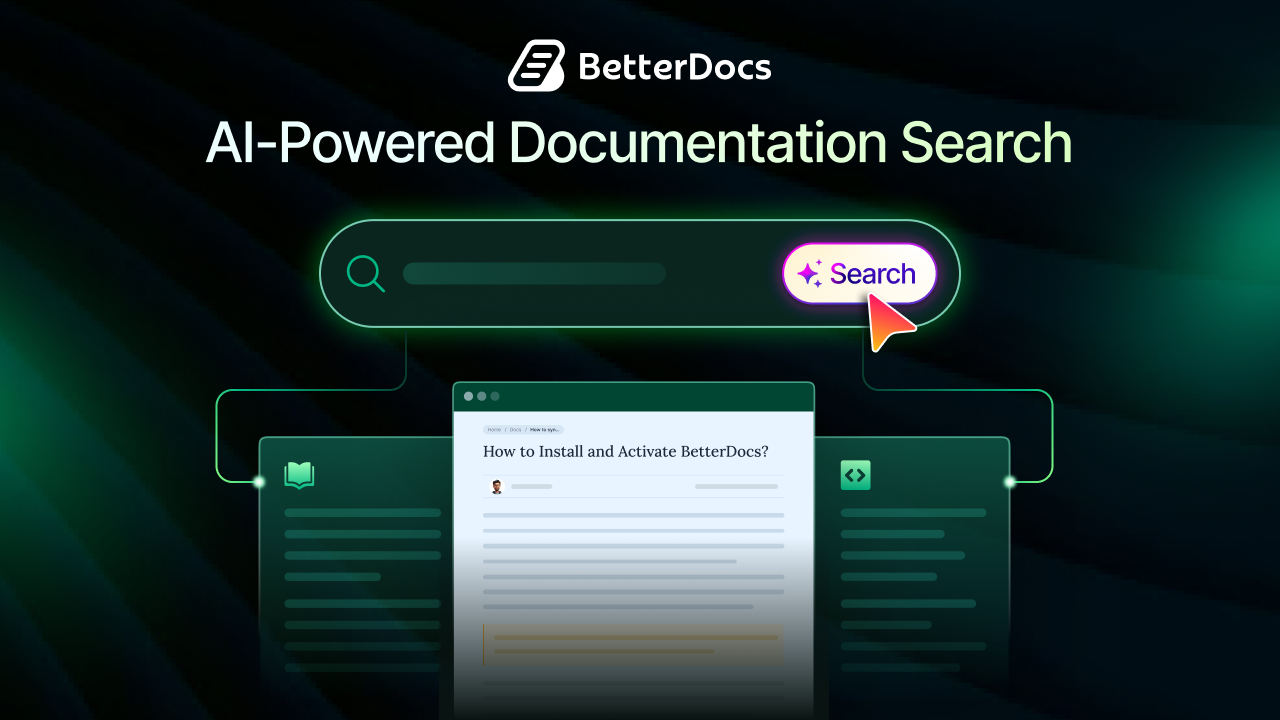
That shift is especially important in documentation. Modern users do not want to click through endless categories, scan long FAQ pages, or try five different keyword variations before finding the right answer. They want instant, relevant and natural responses. This is exactly where AI Search is transforming the documentation experience, helping users find answers faster while helping businesses build more efficient, scalable support systems.
TL;DR
Here is a quick summary of the blog post.
| Topic | Key Takeaway |
| What AI Search means | AI Search helps users find answers based on intent, context, and natural language instead of exact keywords |
| Why it matters | Users now expect fast, conversational, and relevant answers inside documentation |
| Main benefit | Better self-service, quicker issue resolution, and reduced support dependency |
| Traditional search problem | Keyword-based search often returns irrelevant results and fails to understand user intent |
| Documentation impact | AI Search improves discoverability, product onboarding, troubleshooting, and ongoing customer support |
| What to look for | Natural language understanding, semantic search, context-aware results, speed, integrations, and analytics |
| Biggest risk | AI works best only when documentation is structured, updated, and easy to interpret |
| Best optimization strategy | Write intent-focused content, use natural headings, build topic clusters, and keep docs updated |
| Future direction | Documentation is becoming conversational, personalized, predictive, and AI-assisted |
| BetterDocs angle | A well-structured knowledge base creates the foundation needed for effective AI-powered documentation experiences |
The Evolution of Documentation Search
Documentation search has never been just a technical feature; it shapes how users experience support. When search works, users feel confident and independent. When it fails, frustration grows fast and support tickets start piling up.
That is why the shift from traditional search to AI Search matters so much. Documentation is no longer judged only by how much information it contains, but by how quickly and accurately users can reach the answer they need.
Traditional Search: How Documentation Search Worked Before
Traditional documentation search was mostly built on keyword matching. A user typed a word or phrase, and the system returned articles containing that same term. If the exact wording appeared in the title, heading, or article body, the result was more likely to show up.
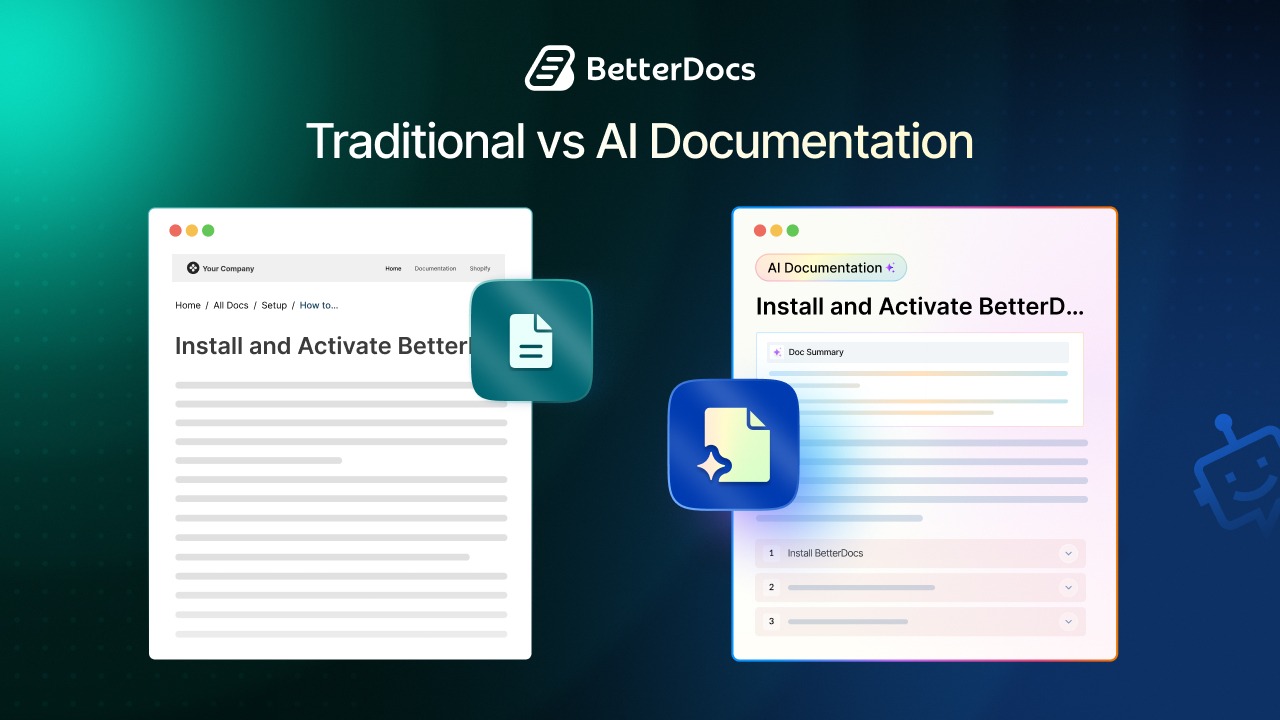
This approach worked reasonably well when documentation libraries were small and user queries were predictable. But it depended heavily on exact phrasing. If a user searched for “sign-in problem” while the article used “login issue,” the search engine might miss the right result entirely. That gap between how users ask questions and how content is written has always been one of the biggest weaknesses of traditional documentation search.
Manual navigation was another major part of the old model. Users often had to browse categories, subcategories, and article lists until they found something relevant. That may have been acceptable in the past, but it creates friction today, especially for users who want immediate help in the middle of a task.
What Is AI Search?
AI Search is a smarter way of helping users find information. Instead of relying only on exact keywords, it interprets meaning, user intent and contextual relationships across your content to deliver more relevant answers.
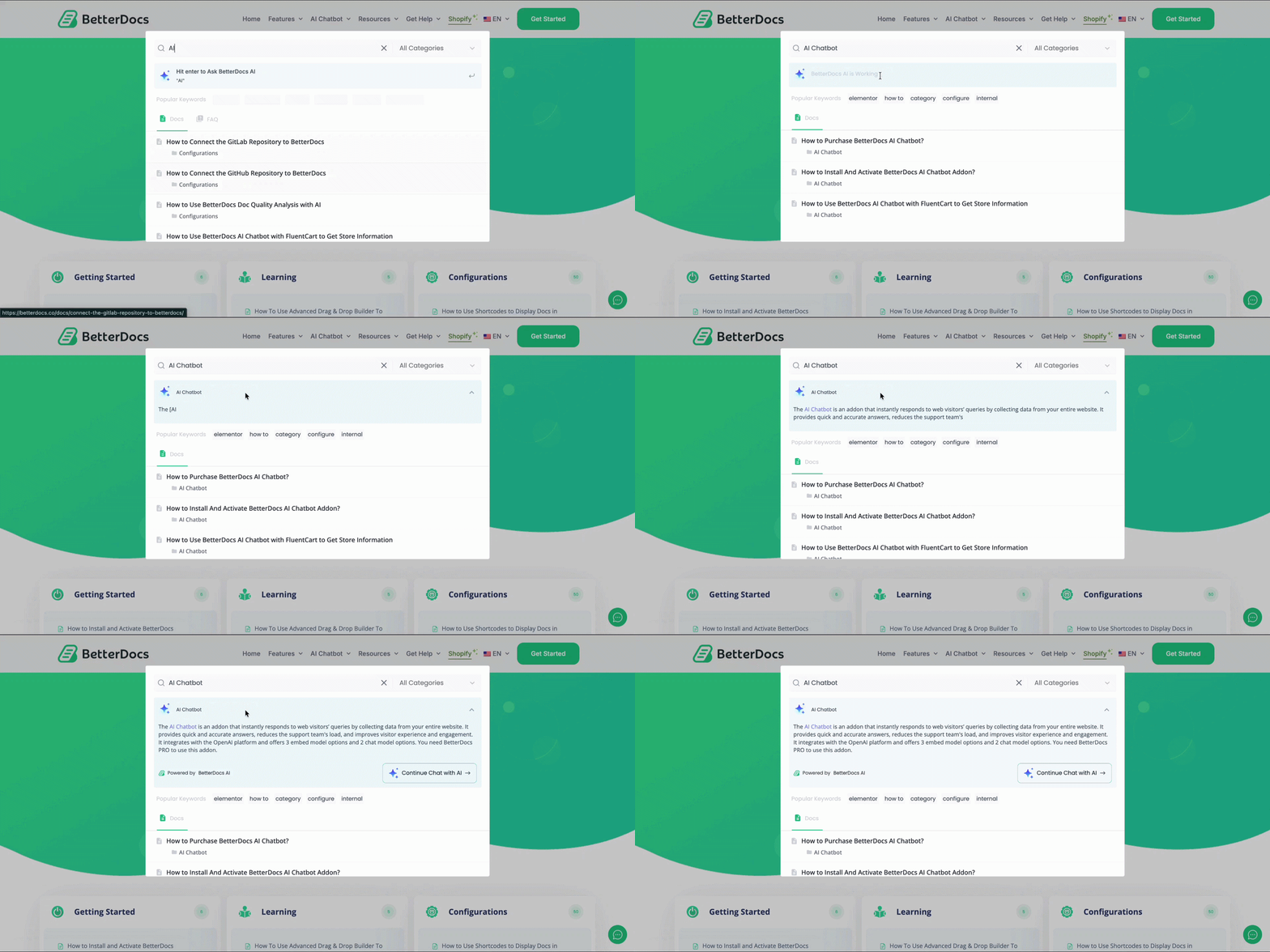
In documentation, this makes a huge difference. It changes the experience from “find the right article yourself” to “describe your problem naturally and get pointed toward the best solution.” That is a major leap in usability, especially for growing knowledge bases. This shift isn’t limited to documentation. This same shift toward intent-based search is reshaping other industries too. In e-commerce, for example, AI search helps customers navigate online stores using natural language, with a WooCommerce AI search solution able to surface relevant products even when shoppers skip exact catalog terms.
How AI Search Differs from Traditional Search
The biggest difference is that AI Search is intent-driven rather than keyword-dependent. It does not just look for word matches. It tries to understand what the user is asking, what they are trying to do and which answer is most likely to help.
| Aspect | Traditional Search | AI Search |
| Search method | Relies on keyword matching to find exact or partial word matches in documentation. | Uses intent-based understanding to interpret what the user actually means. |
| Query style | Works best when users type the exact terms used in the documentation. | Supports natural language queries such as full questions and conversational phrases. |
| Understanding context | Has limited ability to understand context, often treating each word separately. | Delivers context-aware responses by analyzing meaning, relationships, and user intent. |
| Result relevance | May return multiple loosely related articles with matching keywords. | Prioritizes the most relevant answers based on semantic meaning rather than word overlap. |
| Synonyms and variations | Often struggles with synonyms, alternate phrasing, or non-technical wording. | Understands related concepts, synonyms, and different ways users describe the same problem. |
| User experience | Requires more trial and error, scrolling, and manual filtering through results. | Makes documentation feel faster, smarter, and more conversational. |
| Best use case | Works reasonably well for simple, predictable searches in smaller documentation libraries. | Works better for growing knowledge bases where users need quick, accurate, and contextual answers. |
Natural language processing plays a central role here. Users can phrase questions in the way they naturally speak or type: “How do I connect Stripe?” or “Why am I not receiving verification emails?” AI Search can analyze those queries and connect them to relevant documentation even when the article uses different wording.
Context awareness also makes AI Search more powerful. For example, a query about “integration setup” should ideally surface onboarding steps, troubleshooting tips and related configuration docs, not just articles with the word “integration” repeated several times. This semantic understanding is what makes AI search in documentation more useful than standard documentation search.
Why AI Search Is Becoming the New Standard
The rise of conversational AI has changed how people interact with information everywhere. Users now ask full questions in search bars because they have become used to chat-based interfaces, AI assistants and intelligent recommendations.
That behavior shift is pushing documentation platforms to evolve. People no longer see support content as something they should browse manually. They expect the system to guide them quickly toward the answer.
For businesses, that expectation is not a trend to ignore. Faster information retrieval improves the customer experience, reduces friction during support interactions and makes documentation more valuable as a self-service resource. That is why documentation AI search is quickly becoming the new standard rather than an optional enhancement.
Why AI Search Matters for Documentation
Documentation exists to reduce confusion and remove blockers. But that goal is only achieved when users can actually find what they need. AI Search matters because it aligns documentation discovery with how people really think, ask and troubleshoot.
Instead of adapting themselves to the system, users can interact with documentation more naturally. That small change creates a much larger improvement in speed, usability and confidence across the entire support experience.
Users Ask Questions, Not Search Keywords
Most users do not think in documentation labels. They think about problems, goals, and outcomes. They are far more likely to search for “How do I reset my password?” than “password authentication credential reset workflow.”
The same pattern appears across products and industries. A user might ask, “How can I connect to Stripe?” “Why is my plugin not working?”, or “How do I change my billing email?” These are natural questions, not keyword strings. Traditional search often forces users to translate those thoughts into the exact wording used in your articles. AI Search removes that burden.
This is especially important in support moments. When users are stuck, they do not want to guess the “correct” search phrase. They want the system to understand the problem and direct them toward the answer. That is exactly where AI search in documentation creates a better experience.
AI Search Understands Context, Not Just Words
One of the strongest advantages of AI Search is that it understands relationships between words and ideas. It can interpret synonyms, related concepts and different ways of expressing the same issue. That means a query for “connect payments” may still lead a user to Stripe setup documentation, even if the article never uses the exact phrase “connect payments.”
It also helps with intent detection. If someone searches for “plugin broken after update,” AI Search can infer that the user may need troubleshooting steps, compatibility notes, rollback guidance, or changelog-related documentation. A traditional documentation search would likely return any article containing “plugin” and “update,” even if it is not relevant.
The context-sensitive search documentation feels more helpful and human. It reduces the mismatch between user language and internal product language, which is often one of the main causes of failed searches.
For example, a customer searching for “my invoice won’t download” could still find an article titled “Export Billing Receipts”, even though neither phrase shares the same keywords. AI Search connects the intent behind both requests instead of relying on exact wording.
AI Makes Documentation Feel Like a Conversation
When AI Search works well, documentation stops feeling like a static database and starts feeling like guided assistance. Instead of scanning ten articles, users get a more direct path to the answer.
That conversational feel reduces friction because users no longer have to work as hard to interpret your information architecture. They can ask broad, specific, or messy questions and still get useful direction.
It also supports faster issue resolution. Personalized, context-aware responses make it easier for users to keep moving, whether they are onboarding, troubleshooting, or exploring advanced features. In practice, that means documentation becomes a more active part of the support journey rather than a passive content repository.
Key Benefits of AI Search in Documentation
The value of AI Search is not limited to better search results. Its impact spreads across self-service support, content discoverability, customer satisfaction, and operational efficiency. In other words, it improves both the user experience and the business outcomes behind your documentation strategy.
For teams managing a growing knowledge base, AI Search is more than a convenience feature. It becomes a practical advantage that helps documentation perform like a true support asset.
Faster Information Discovery
The most obvious benefit is speed. AI Search helps users reach relevant content faster by reducing the need for endless scrolling, repeated keyword attempts, or manual category browsing.
Instead of showing a long list of loosely matched articles, it can guide users toward a clearer answer path. That reduces time-to-resolution, which is especially valuable when users are already frustrated or under pressure.
For example, someone searching “how to fix checkout error after enabling tax settings” does not want to inspect a dozen tax-related articles. They want the most relevant troubleshooting guidance right away. AI Search increases the chances of that happening.
Better Product Adoption
AI Search does more than help users solve problems; it also helps them get more value from your product. When users can quickly find answers, they are more likely to keep exploring features, complete key setup steps, and use the product with greater confidence instead of getting stuck early.
This is especially important for SaaS products, where adoption often depends on how smoothly users move from onboarding to regular usage. If documentation can instantly answer questions like “How do I set this up?”, “What should I do next?” or “Can this tool support my workflow?”, it becomes part of the product adoption journey rather than just a support resource.
Over time, this leads to stronger feature adoption, lower drop-off during onboarding and a better overall customer experience. In that sense, effective AI-powered documentation does not just reduce support tickets; it actively helps users become more successful with your product.
Higher Customer Satisfaction
Better search leads to a better self-service experience. When users can solve problems quickly on their own, they feel more in control and more confident in your product.
This reduces frustration, especially for new users who may still be learning your terminology and workflows. Instead of getting stuck in documentation, they can continue with the task they originally wanted to complete.

Over time, this also improves product adoption. Users engage more deeply with a product when help is easy to access and simple to understand. Documentation becomes part of a positive product experience rather than a last-resort support destination.
Lower Support Costs
Many support teams deal with the same questions again and again. Password resets, integration setup issues, permission errors, billing changes and onboarding confusion often make up a large portion of incoming tickets.
AI Search helps reduce these repetitive tickets by making self-service more effective. If users can quickly find accurate answers in your documentation, they have fewer reasons to contact your support team for basic guidance.
That lowers workload for support agents and improves knowledge utilization. Instead of keeping solutions trapped inside tickets, calls, or internal chat threads, businesses can route users back to documentation that already contains the answer.
Better Content Discoverability
In many knowledge bases, valuable articles become buried over time. Older content, niche troubleshooting guides and advanced workflow tutorials may still be useful, but users rarely find them through manual browsing.
AI Search improves discoverability by surfacing relevant content based on intent and context rather than article popularity alone. That gives existing content a second life.
This is particularly useful for long-term documentation libraries. Search in documentation should not only prioritize the newest or most-viewed pages. It should help users uncover the most useful article for the problem at hand, even if that content is older or less visible in the site structure.
How AI Search Improves the Entire Customer Support Journey
AI Search does not help only at the point of search. It improves the full support lifecycle, from first-touch onboarding to long-term product use. That makes it a strategic capability, not just a documentation enhancement.
When documentation search becomes faster and more contextual, users can move through support moments with less friction. The result is a smoother journey before, during and after support interactions.
Before Contacting Support
The first benefit appears before a support ticket is ever created. Many users simply want a quick answer without needing to wait for an agent, submit a form, or explain their issue repeatedly.
AI Search supports that expectation by helping users solve common problems independently. When documentation responds more intelligently to real questions, self-service becomes more practical and trustworthy.
This creates a healthier support funnel. Tickets that do reach your team are more likely to involve complex cases, while simpler issues are resolved through documentation. That improves efficiency without compromising customer experience.
During Product Onboarding
Onboarding is one of the most important moments in the customer journey. New users have more questions, less product familiarity, and a lower tolerance for friction.
AI Search helps by providing instant guidance during setup, integration and early feature usage. Instead of forcing new users to navigate an unfamiliar documentation structure, it lets them ask what they need in plain language.
That also supports easier feature discovery. A user might search, “Can I restrict access by role?” or “How do I import docs from another platform?” and quickly discover capabilities they did not know existed. Good documentation search does more than solve problems; it unlocks product value.
After Product Updates
Product updates often create confusion, even when they are positive. New features, changed settings, renamed workflows, or updated interfaces can all create uncertainty for existing users.
AI Search helps users find newly added features and understand changes without extensive searching. It can connect update-related queries to changelogs, tutorials, migration guides and revised feature documentation more effectively than basic search.
This matters because users rarely search using release-note language. They search using impact language, such as “where did this setting go?” or “how do I use the new editor?” AI Search is better equipped to handle those kinds of real-world questions.
For Existing Customers
Long-term customers continue to need help, especially when they explore deeper workflows, add new team members, or troubleshoot edge cases. Documentation should support them beyond the first few weeks of product use.

AI Search strengthens continuous self-service by helping experienced users troubleshoot faster and discover advanced knowledge more efficiently. That reduces reliance on support for recurring or mid-level issues.
It also encourages ongoing engagement with your knowledge base. When users know that documentation is actually useful and easy to search, they are more likely to return to it first instead of defaulting to support every time a question comes up.
Essential Features to Look for in a Documentation AI Search Solution
Not every AI Search solution delivers the same value. Some tools add a conversational layer on top of weak content, while others are built to truly improve documentation discovery and self-service support.
That is why choosing the right capabilities matters. A strong documentation AI search solution should not only sound intelligent, but it should also make your knowledge base more accurate, easier to navigate, and more actionable for users.
Natural Language Understanding
Users should be able to search the way they naturally speak. Natural language understanding allows the system to interpret full questions, imperfect phrasing and everyday expressions instead of requiring exact keyword matches.
This is essential for reducing search friction. A user should not have to guess whether your documentation says “account deactivation,” “user offboarding,” or “disable profile access.” They should be able to ask what they mean and still get relevant results.
Semantic Search Capabilities
Semantic search goes beyond word matching to understand relationships between ideas. This is what allows AI Search to connect “payment setup” with “Stripe integration” or “login trouble” with “authentication troubleshooting.”
Without semantic search, AI features often become superficial. With it, documentation search becomes much better at mapping real-world user intent to the right article or answer.
Context-Aware Results
Context-aware search results improve relevance by interpreting the broader meaning of a query. Instead of returning every article that contains a repeated phrase, the system prioritizes what is most likely to solve the user’s problem.
This is especially useful for complex documentation libraries with overlapping topics. If a user searches for “export customer data,” the best result may depend on whether the documentation includes permissions, compliance, reporting, or API workflows. Context helps separate those paths intelligently.
Fast Search Performance
Even the smartest search system loses value if it feels slow. Search performance directly shapes user trust. If results are delayed, users assume the system is not useful and often abandon it quickly.
AI Search should feel fast enough to support active problem-solving. Instant suggestions, quick modal responses and low-latency result delivery all contribute to a smoother documentation experience.
Analytics to Understand User Search Behavior
Search analytics are one of the most underrated features in any documentation search system. They reveal what users are looking for, where they are struggling and which parts of your knowledge base may be underperforming.
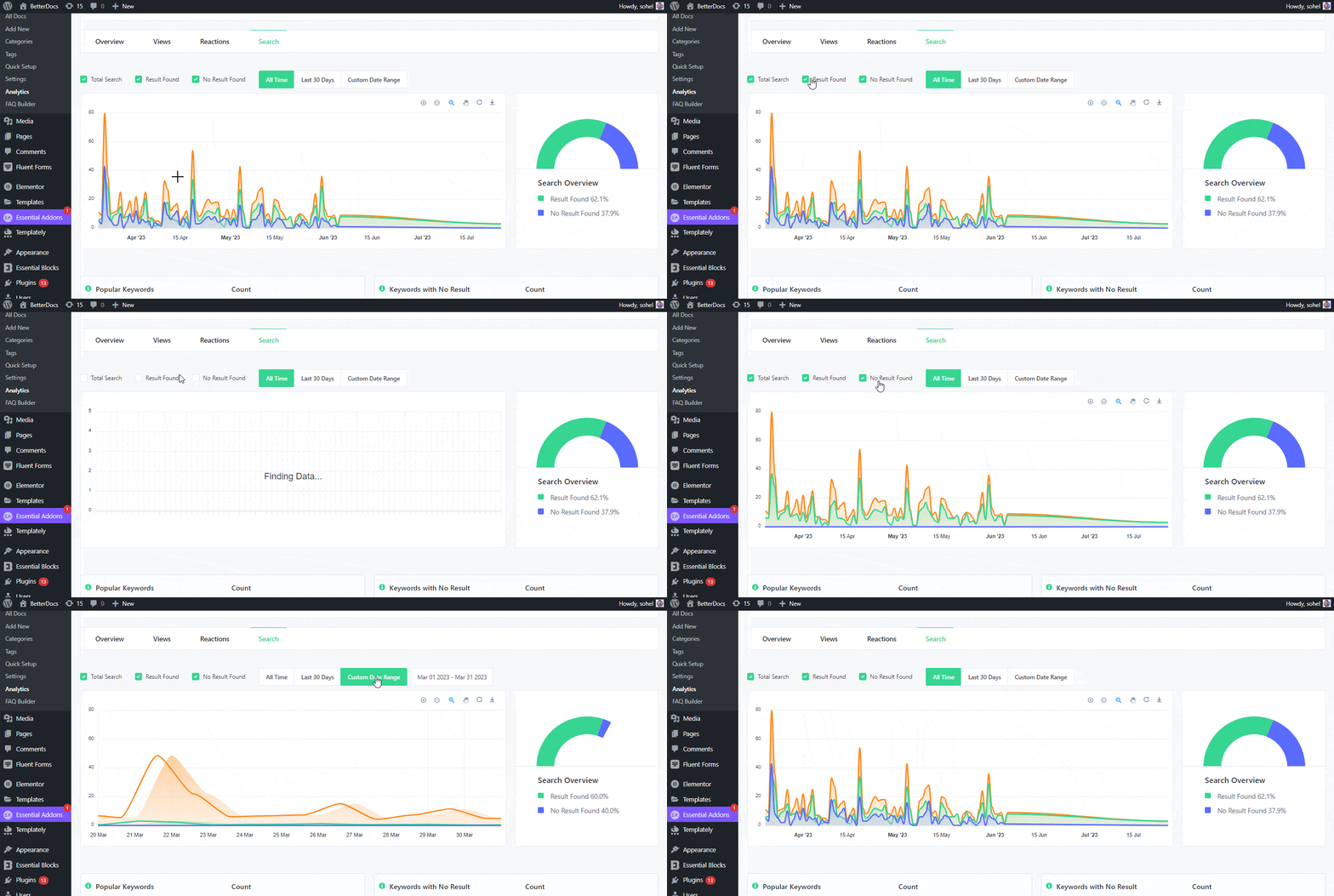
Popular queries help you identify what matters most to users. Failed searches expose terminology mismatches, missing content, or discoverability gaps. Query patterns can also show content optimization opportunities that improve both self-service and support performance.
Without analytics, you are guessing. With analytics, documentation search becomes measurable and continuously improvable.
Easy Knowledge Base Integration
A good AI Search solution should integrate cleanly with your existing knowledge base rather than forcing a major documentation rebuild just to function.
That means it should work well with your content structure, categories, tags, article relationships and publishing workflow. The easier it is to connect search intelligence to your documentation ecosystem, the easier it becomes to scale support over time.
Common Challenges of AI Search (And How to Overcome Them)
AI Search is powerful, but it is not magic. Its effectiveness depends heavily on the quality, structure and freshness of the content behind it. If the documentation itself is weak, the search experience will reflect that.
That is why successful implementation requires more than turning on an AI feature. Teams also need to strengthen the knowledge base that powers it, so the system can deliver accurate and useful results.
Outdated Documentation Produces Weak Results
AI Search can only work with the information available to it. If your articles are outdated, incomplete, or inconsistent with the current product, users may receive answers that are technically relevant but practically unhelpful.
The solution is simple in principle, though not always easy in practice: documentation must be treated as a living product asset. Regular reviews, update cycle and version alignment are necessary if AI Search is expected to perform well.
Poor Content Structure Reduces AI Accuracy
Even strong information becomes harder to interpret when it is poorly structured. Long, unfocused articles that cover too many topics at once often make it difficult for AI systems to identify the best answer path.
Clear article boundaries, descriptive headings, skimmable sections and dedicated content for specific intents all improve search quality. Structure is not just for readers; it also helps the system understand your content more effectively.
Missing Metadata and Categories
Metadata still matters in an AI-driven world. Categories, tags, related articles, internal linking, and content labels all create signals that help search systems interpret the knowledge base more accurately.
If content is loosely organized or inconsistently labeled, AI Search has less support for ranking and contextual relevance. Good metadata improves both traditional documentation search and AI-assisted discovery.
Balancing AI Automation with Human-Curated Documentation
AI can improve search, summarize content and surface related information, but it should not replace a thoughtful documentation strategy. Human editors still play a critical role in defining structure, accuracy, tone and completeness.
The best approach is balance. Use AI to improve discovery and efficiency, but rely on human oversight to maintain trust and clarity. Documentation is ultimately a communication system and communication quality still depends on editorial judgment.
Best Practices for Optimizing Documentation for AI Search
If you want AI Search to perform well, you need to prepare your documentation for it. Optimization is not about stuffing articles with keywords. It is about making your knowledge base easier for both users and intelligent systems to understand.
That requires a shift in documentation strategy. Instead of writing only to publish information, teams need to write in ways that support discoverability, intent matching, and contextual retrieval.
Write Clear, Intent-Focused Articles
Each article should solve a recognizable problem or answer a specific user goal. The more focused the article, the easier it becomes for AI Search to determine when and why it should appear.
For example, “How to Reset Your Password in Under 2 Minutes” is usually more effective than burying password reset instructions inside a broad “Account Settings Overview” page. Intent-focused content improves both search precision and user satisfaction.
Use Natural Language, Headings
Your headings should reflect how users actually think and search. Instead of overly technical or internal-only labels, use headings that sound close to real questions and real actions.
For example, “How to Connect Stripe to Your Store” will often outperform something vague like “Payment Gateway Configuration.” Natural language headings increase clarity for readers and provide better signals for AI search in documentation.
Build Topic Clusters Instead of Isolated Articles
Strong documentation is not just a collection of pages; it is a connected knowledge system. Topic clusters help AI Search understand relationships between concepts, tasks and troubleshooting paths.
For example, a Stripe integration cluster might include setup instructions, webhook troubleshooting, failed payment resolution, tax settings and refund workflows. When these articles are linked and organized well, AI can surface more relevant results and related reading paths.
Keep Documentation Updated Regularly
Freshness matters. If product interfaces, features, or workflows change often, your documentation must reflect those changes quickly. Otherwise, AI Search may confidently direct users to outdated instructions.
A regular update process helps preserve trust. It also prevents the search experience from becoming a source of confusion rather than clarity.
Add FAQs That Match Real User Questions
FAQ sections are especially valuable because they often mirror the exact language users type into documentation search bars. When written well, they create strong query-to-answer alignment.
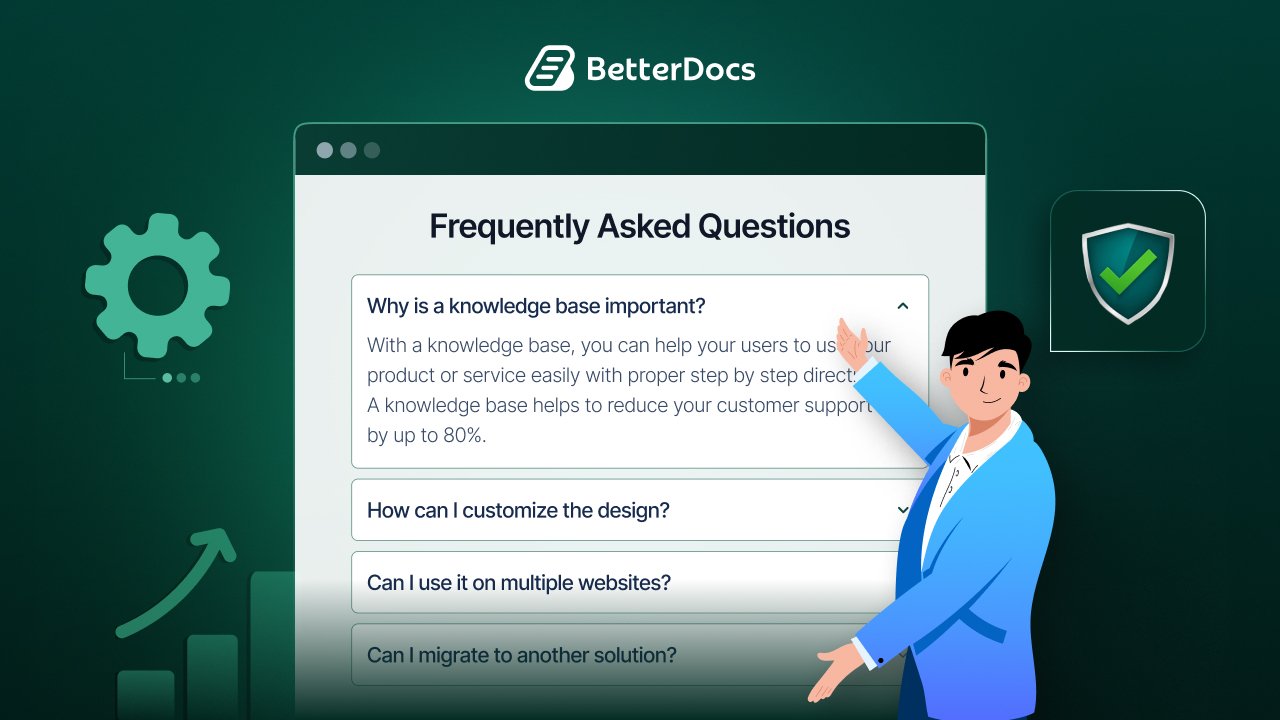
Instead of generic FAQ entries, focus on real search behavior. Questions like “Why is my verification email delayed?” or “Can I connect multiple payment accounts?” are much more useful than abstract, catch-all prompts.
Organize Documentation with Logical Categories and Internal Links
Good organization still matters, even with AI-powered discovery. Logical categories help users browse when needed, while internal links guide them to related solutions and deeper learning.
This structure also strengthens documentation AI search by improving relationships between articles. A well-linked, well-categorized knowledge base gives AI more context to work with and makes the overall support experience more reliable.
Future Trends in AI Search for Documentation
AI Search is already reshaping documentation, but the next phase will go even further. Search will become more interactive, more personalized and more proactive in how it supports users.
That means businesses should think beyond search bars alone. The future of documentation is moving toward systems that anticipate needs, adapt to context and reduce friction before users even realize they need help.
Conversational Knowledge Bases
Documentation is increasingly moving toward conversational interfaces where users can ask follow-up questions, refine a problem and explore related solutions in real time.
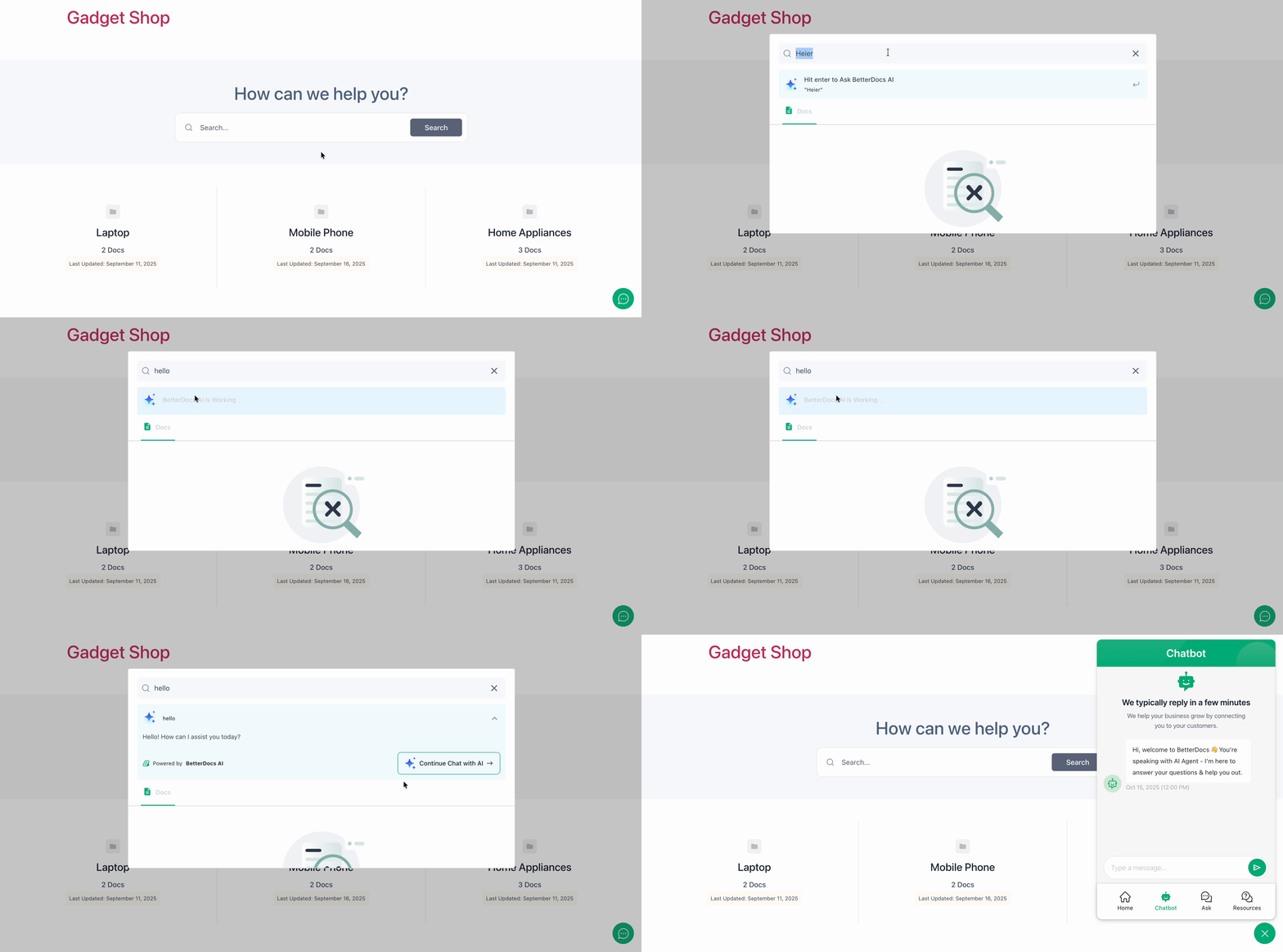
This model feels more natural than static article retrieval because it mirrors how people solve problems through dialogue. It also reduces the need to restart the search process every time a user needs one more piece of clarification.
Personalized Search Results
Not every user needs the same answer. A beginner may need step-by-step onboarding guidance, while an advanced user may need API references or edge-case troubleshooting.
Personalized search results will become more common as documentation systems learn from product context, user behavior, or role-based needs. This can make documentation more relevant without forcing businesses to create entirely separate support ecosystems.
Voice-Based Documentation Search
As voice interfaces continue to expand, documentation search may also become more voice-friendly. This is particularly useful in hands-busy or mobile-first scenarios where typing is inconvenient.
Voice-based documentation search will depend heavily on strong natural language understanding, concise answer generation and content designed around question intent rather than rigid formatting.
AI-Powered Documentation Recommendations
Future documentation systems will not just answer the query; they will recommend what the user should read next. That may include related setup steps, preventative guidance, advanced use cases, or troubleshooting branches.
This recommendation layer can improve onboarding, reduce repeated errors, and help users discover more value from the product without requiring them to search for every next step manually.
Proactive Support Before Users Even Search
The most advanced direction for AI Search is proactive support. Instead of waiting for a user to search, systems may offer timely guidance based on the page they are viewing, the feature they are using, or the action they are attempting.
For example, if a user is configuring a payment gateway and pauses on a known friction point, the system could surface relevant setup help automatically. That kind of contextual assistance turns documentation into an active support layer inside the product experience.
How BetterDocs Helps You Deliver an AI-Powered Documentation Experience
AI Search works best when the knowledge base behind it is structured, searchable and easy to maintain. That means the real foundation of better documentation search is not just the AI layer itself; it is the quality of the documentation system powering it.
For teams using WordPress, BetterDocs approaches this from a practical angle. Its platform focuses on creating organized, searchable, and user-friendly documentation experiences, while also supporting features such as AI-powered search, related docs, analytics, Git sync, internal knowledge bases, and multilingual documentation.
Build a Well-Structured Knowledge Base That AI Can Understand
AI Search performs better when your documentation has a clear structure, categories, tags and meaningful relationships between articles. BetterDocs emphasizes that foundation by supporting organized documentation layouts, role-based internal knowledge bases, multilingual documentation and content structures designed for discoverability.
This matters because AI search in documentation is only as good as the content system beneath it. If your knowledge base is easy to organize and maintain, it becomes much easier for intelligent search experiences to surface the right information at the right time.
Improve Documentation Search with Better User Experience
Search quality is not only about relevance, it is also about user flow. BetterDocs highlights features such as an advanced live search bar, an AI-powered search modal, related documentation surfacing, glossary support, estimated reading time, and a scrollable table of contents to make information easier to discover and consume.
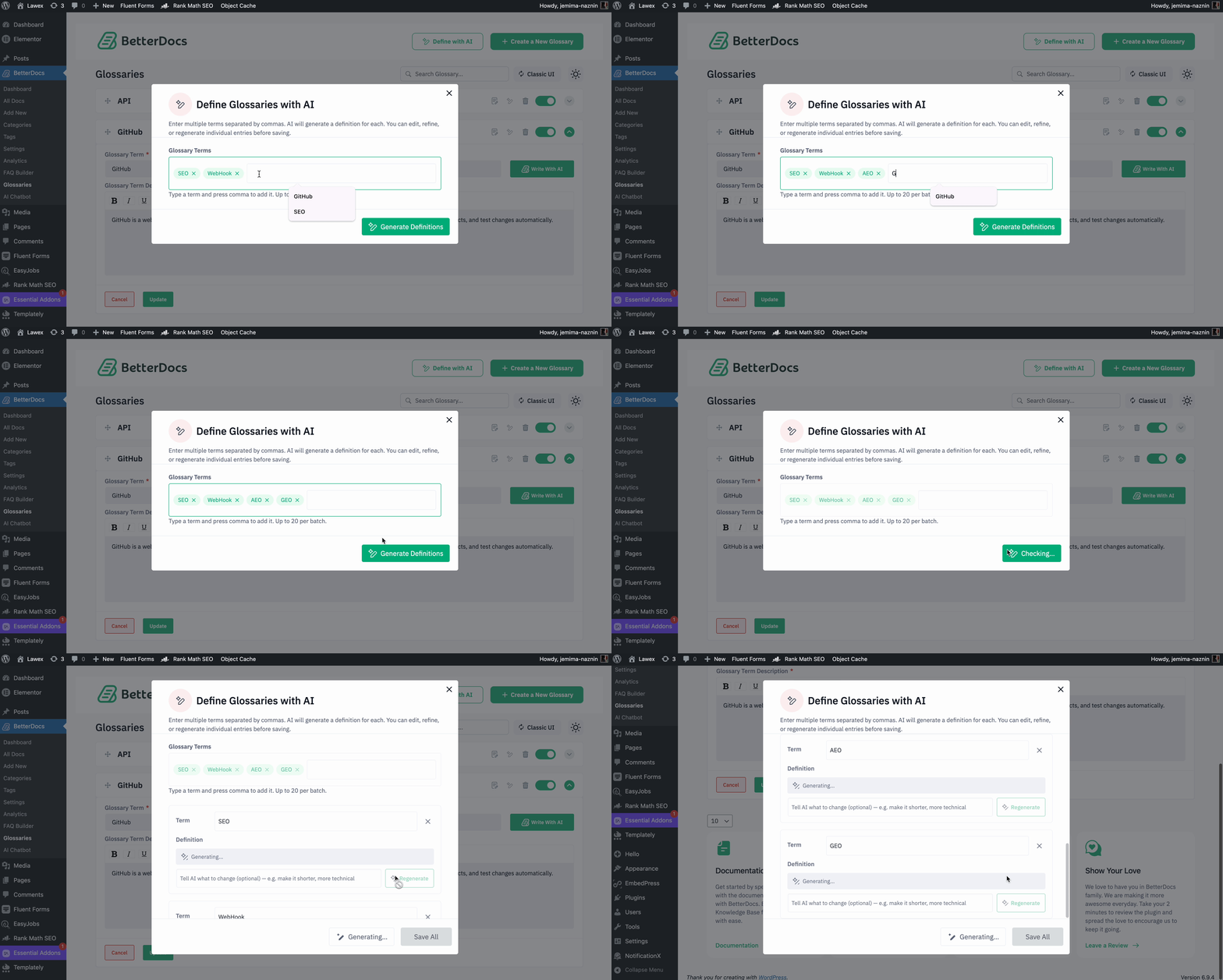
Taken together, these features support a smoother documentation experience. Users can browse faster, understand context more easily, and move between related topics without feeling lost inside the knowledge base.
Scale Self-Service Support as Your Product Grows
As products expand, documentation often becomes more complex to manage. BetterDocs includes capabilities such as Git sync, import/export, third-party migration, analytics reporting and centralized knowledge base management that can help teams maintain support content as they scale.
That makes the transition to AI-powered support more realistic. While AI Search is transforming how users interact with documentation, its effectiveness still begins with a well-organized knowledge base. BetterDocs provides the structural foundation for creating searchable, scalable and user-friendly documentation experiences that are better prepared for the future of AI-powered support.
Prepare Your Documentation for the Future of AI Search
AI Search is fundamentally changing how users expect to find information. They no longer want to hunt through folders, guess the right keyword, or read five articles just to solve one problem. They want fast, relevant, and contextual help that feels natural.
For businesses, that shift creates a clear opportunity. Teams that modernize documentation search can reduce support costs, improve customer satisfaction, and make self-service support far more effective. The future of documentation is not just searchable—it is conversational, contextual, and intelligent. Businesses that invest in well-structured documentation today will be in the strongest position to benefit from every future advancement in AI-powered search.
The best time to prepare is now. Invest in a well-structured knowledge base, optimize your content for real user intent, and treat documentation as a core part of your customer experience. That is how you build documentation that is ready for the next generation of AI-powered support.
If you found this blog helpful, you can subscribe to our blogs for more articles like this.