Imagine a visitor lands on one of your documentation pages, reads it halfway through and then leaves without finding the answer they actually needed. They did not explore related articles. They did not dig deeper. They just left. If you run a knowledge base on WordPress, you already know the frustration.
The problem is not always the content. It is the lack of intelligent content discovery. When related articles are handpicked manually and stay the same for every visitor, you miss the opportunity to serve people based on what they are actually doing in real time.
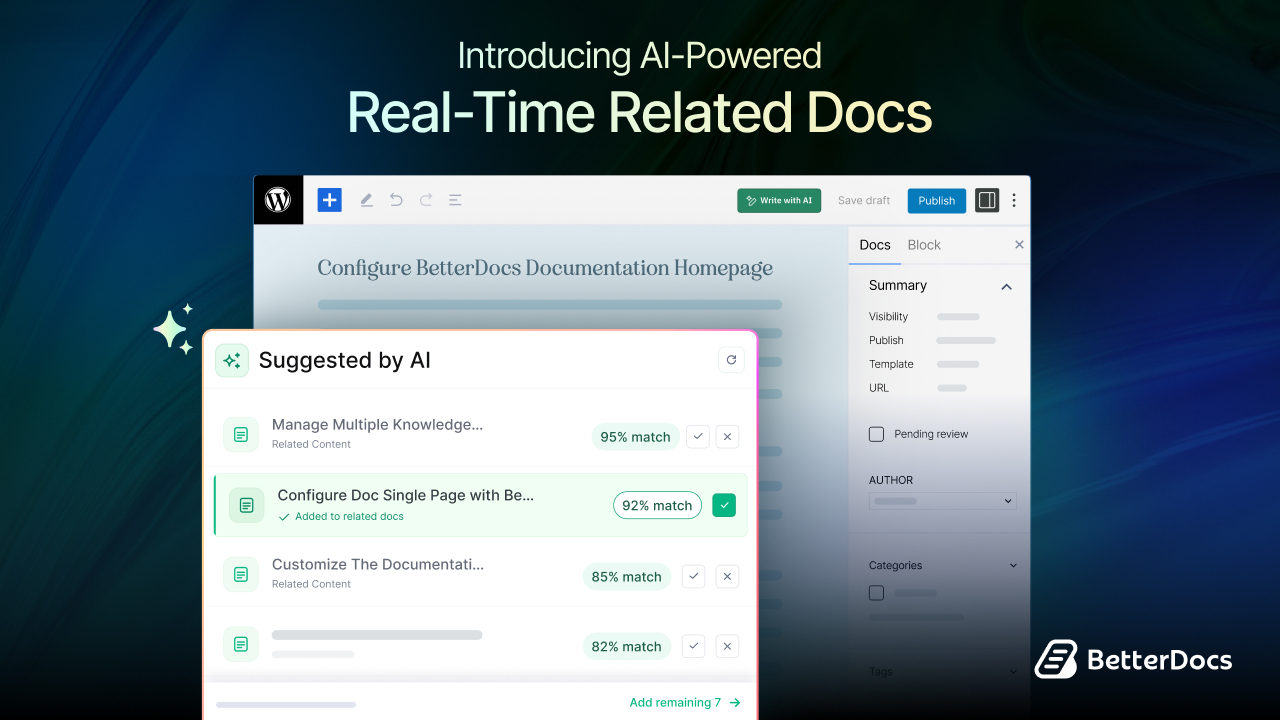
That is exactly the gap that BetterDocs AI-Powered Real-time Related Docs is built to close. This feature uses artificial intelligence to analyze visitor behavior in real time and automatically recommend the most relevant documentation articles to each person at each moment. It is a smarter, more dynamic way to keep visitors engaged and help them find answers faster.
In this guide, you will learn what this feature does, why it matters for your WordPress knowledge base and how to show related docs using BetterDocs.
TL;DR (Too Long, Did Not Read?)
| What is it? | An AI-powered feature in BetterDocs that recommends related docs based on real-time visitor behavior |
| How it works | Tracks reading patterns, scroll depth, search queries, and link clicks to surface relevant articles |
| Why it matters | Reduces bounce rates, improves self-service rates, and keeps visitors engaged longer |
| Who needs it? | WordPress site owners with knowledge bases, support portals, or product documentation |
| How to enable it | Configure through the BetterDocs settings panel inside WordPress |
| Key benefit | Moves beyond static, manually linked related articles to dynamic, personalized suggestions |
Show Related Docs: Why Smart Article Recommendation Matters?
Let us first know about the real-world impact of smart, related doc recommendations and why the traditional approach often falls short.
The Problem with Static Related Articles
Static-related article links feel like a good idea until you realize how limited they actually are. When you manually link “Article B” to “Article A,” every single visitor who reads Article A sees Article B in the related section, whether it is relevant to them or not.
A developer troubleshooting an API error has completely different follow-up needs than a beginner trying to understand basic setup steps. Static links serve neither group particularly well because they treat all visitors as the same.
Over time, your knowledge base grows. Articles get added, updated, or outdated. But those manually linked related articles often stay stale because nobody remembers to go back and update them. The result is a related docs section that gradually loses relevance.
How Real-Time AI Doc Recommendations Change the Experience
With AI-powered recommendations, the related docs section becomes a living part of your documentation rather than a static list. The feature adapts to each visitor. Someone who arrived through a specific search query, spent several minutes on a particular section and clicked a certain link will see different related recommendations than someone who skimmed the same article before moving on.
This kind of dynamic personalization has a measurable impact. According to a report by McKinsey & Company, personalization can reduce customer acquisition costs by up to 50% and increase revenues by 5 to 15% for businesses that apply it in digital contexts. While that statistic applies broadly to personalization, the same logic holds for documentation: showing people what they actually need next increases the likelihood they will find their answer without contacting support.
The Business Case for Better Doc Discovery
Every visitor who cannot find their answer in your knowledge base has two options. They either contact your support team, which costs you time and money, or they leave frustrated, which costs you trust and potentially a customer.
Better doc discovery directly reduces support ticket volume. When visitors can navigate from one relevant article to the next through intelligent recommendations, they solve more problems on their own. That is the core value of self-service documentation and AI-powered related docs make it significantly more effective.
What Are AI-Powered Real-Time Related Docs in BetterDocs?
Before diving into the setup, it helps to understand exactly what this feature does and how it differs from traditional related articles.
Most knowledge base solutions let you manually link related articles to each documentation page. You pick a few articles that seem relevant, add them to the sidebar or footer and make it done. The problem is that those links stay the same for every visitor, regardless of what they searched for, how far they scrolled, or what they clicked.
BetterDocs AI-Powered Real-time Related Docs works differently. Instead of showing a fixed list of manually chosen articles, it observes how each visitor interacts with your documentation and recommends articles based on that behavior. The system pays attention to what visitors read, how far they scroll, what they search for and which links they click. Using that data, it surfaces the articles most likely to help that specific person at that specific moment.
This is not just a cosmetic upgrade. It is a fundamental shift in how your knowledge base connects visitors to the information they need.
Key Features of BetterDocs AI-Powered Real-Time Related Docs
Now that you know about the feature, now we will break down what the feature actually tracks and how its underlying logic works to deliver relevant suggestions.
Behavior Signals It Monitors
The AI does not work on guesswork. It builds its recommendations based on specific behavioral signals from each visitor session. Here is what it observes:
- Reading patterns: Which parts of a documentation article a visitor spends the most time on give the AI strong signals about what topic they are focused on. If someone lingers on a particular section, the system understands that the topic is important to them right now.
- Scroll depth: How far a visitor scrolls through an article tells the AI whether they found what they were looking for or whether they might need more detailed information. Someone who scrolls all the way to the bottom likely consumed the full article and may be ready for the next step.
- Search queries: What a visitor typed into the search box before or during their session reveals their intent in very direct terms. The AI uses this data to align recommendations with the actual vocabulary and problem the visitor is working through.
- Link clicks: Which internal links a visitor follows within your knowledge base shows the AI the trajectory of their journey. This helps surface articles that are logical continuations of that path rather than disconnected suggestions.
Dynamic Updates in Real Time
What makes this feature particularly valuable is the “real-time” aspect. The recommendations do not get calculated once at the beginning of a session and then stay fixed. They update dynamically as the visitor continues to interact with your documentation. If someone starts reading about a basic concept and then clicks into a more advanced article, the recommended docs will shift accordingly to match their evolving context.
How to Configure AI-Powered Real-Time Related Docs in BetterDocs
BetterDocs includes an AI-Powered Real-time Related Docs feature that automatically surfaces the most relevant articles for each visitor as they browse your knowledge base. Rather than relying solely on manually linked related articles, the feature tracks real visitor behavior, including reading patterns, scroll depth, search queries, and link clicks, to recommend the articles most likely to answer their questions at that exact moment.
Follow the steps below to configure it in BetterDocs.
Step 1: Enable the Real-time Related Docs
Before you proceed, you first need to install and activate BetterDocs PRO. Also, make sure you have added an OpenAI API key for AI-based suggestions.
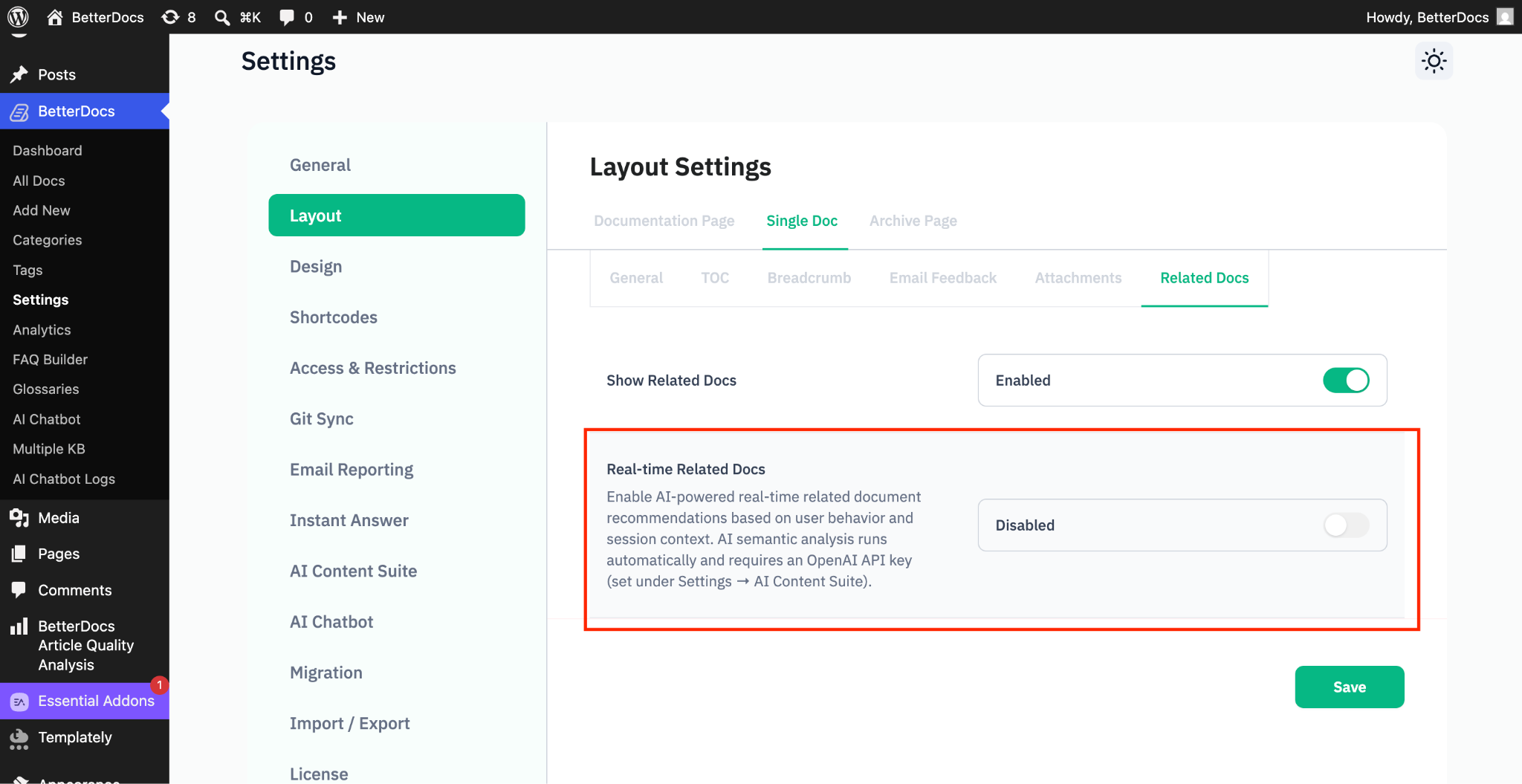
Now, from the settings, go to the Layout ➤ Single Doc ➤ Related Docs.
From there, enable the ‘Related Docs’. Next, enable the “Real-time Related Docs.” This will enable AI-powered, real-time related document recommendations based on user behavior and session context.
Step 2: Configure Real-time Related Docs
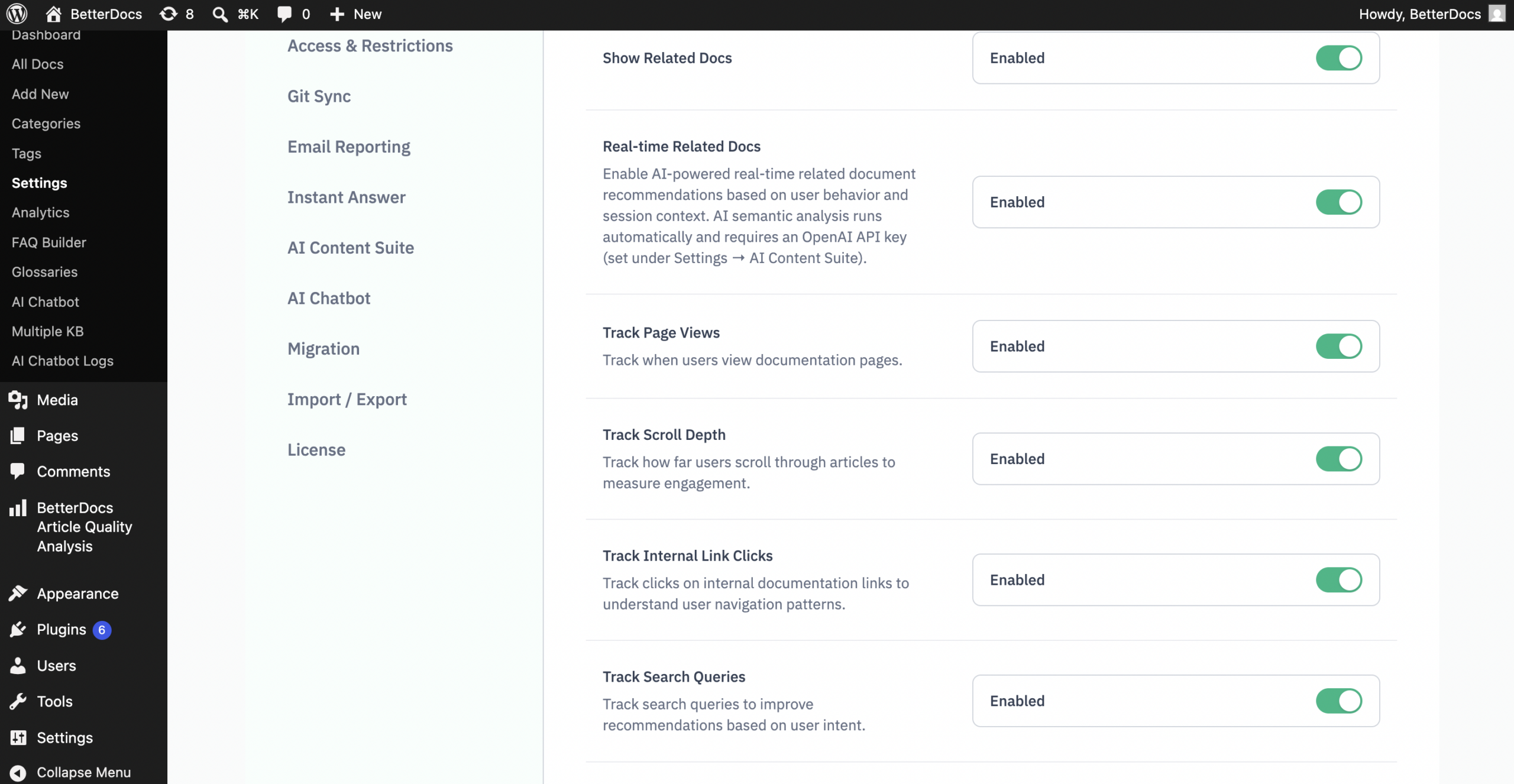
After you have enabled the real-time related docs, you will find different options for how you want the BetterDocs AI to show relevant documentation. You can enable or disable each of these options, like Track Page Views, Track Scroll Depth, Track Internal Link Clicks, Track Search Queries, etc to maintain accuracy while showing relevant documentation. These settings decide which visitor interactions the feature monitors.
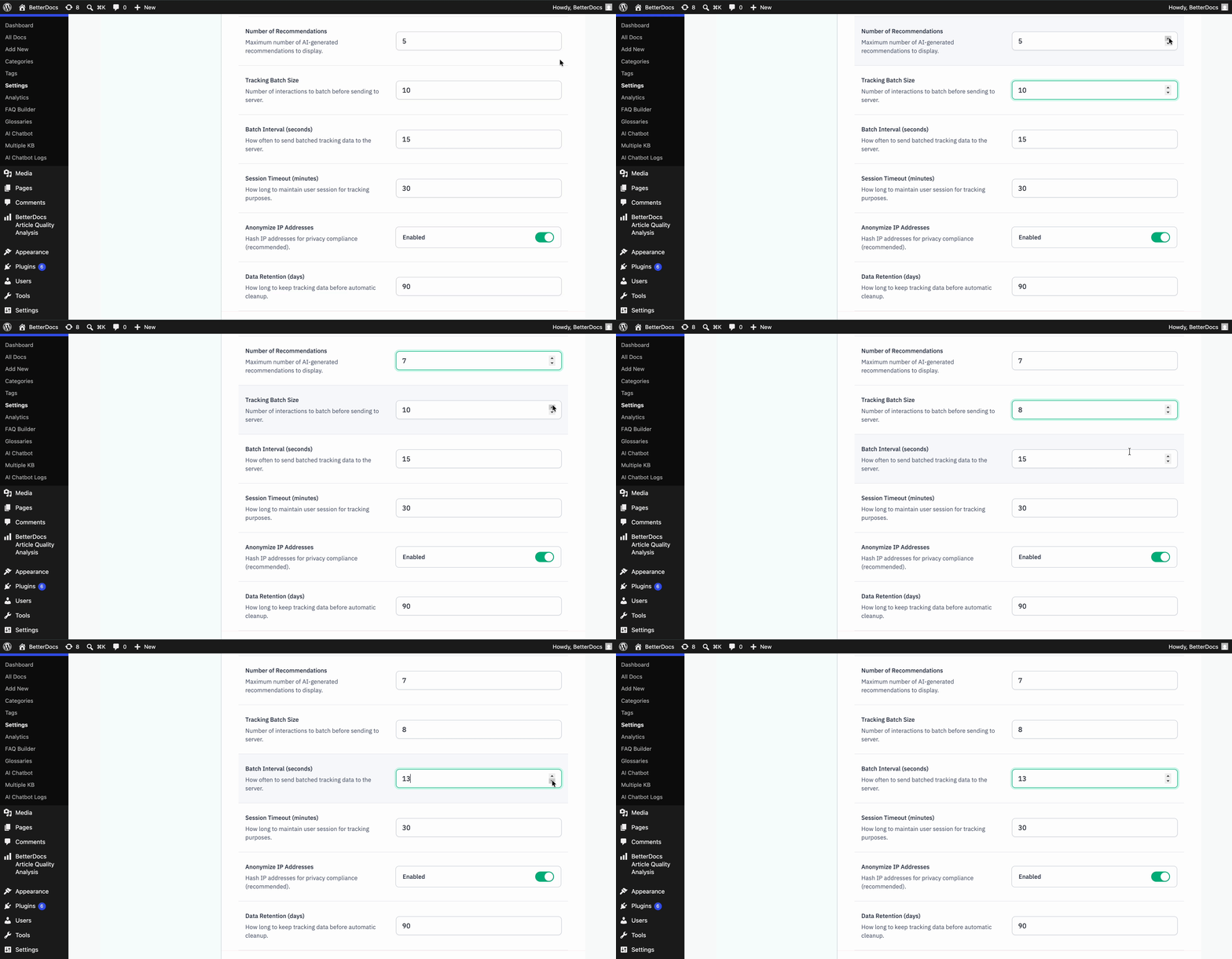
Also, there are some performance setting options like Number of Recommendations, Tracking Batch Size, Batch Interval (seconds) and Session Timeout (minutes). These settings control how tracking information travels from a visitor’s browser to your server.
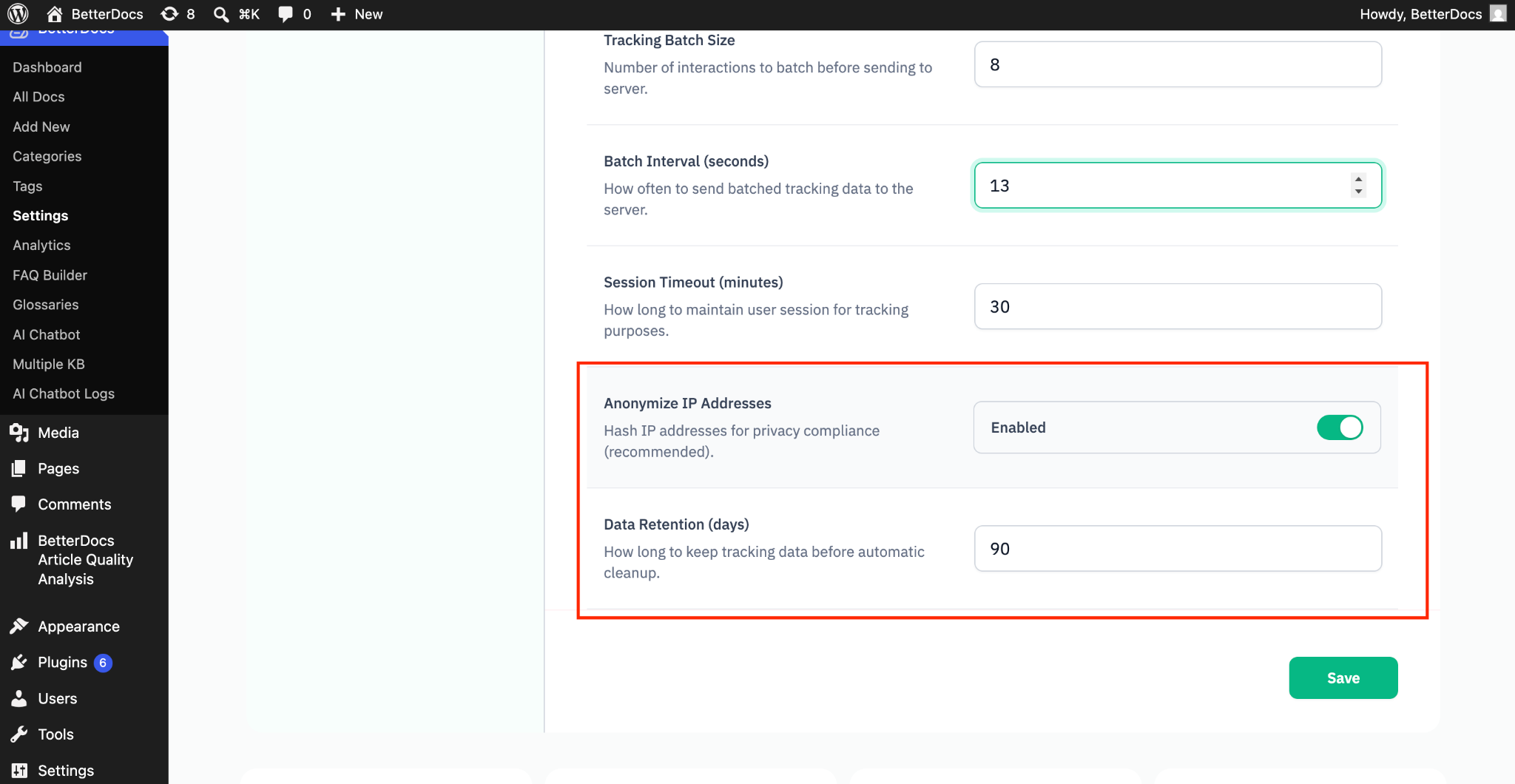
You can configure some privacy settings options too. These settings help you keep your data collection responsible and compliant, like Anonymize IP Addresses, Data Retention (days), etc. After selecting the options, click on the ‘Save’ button to save the changes.
Step 3: Generate AI Suggestions Inside the Editor
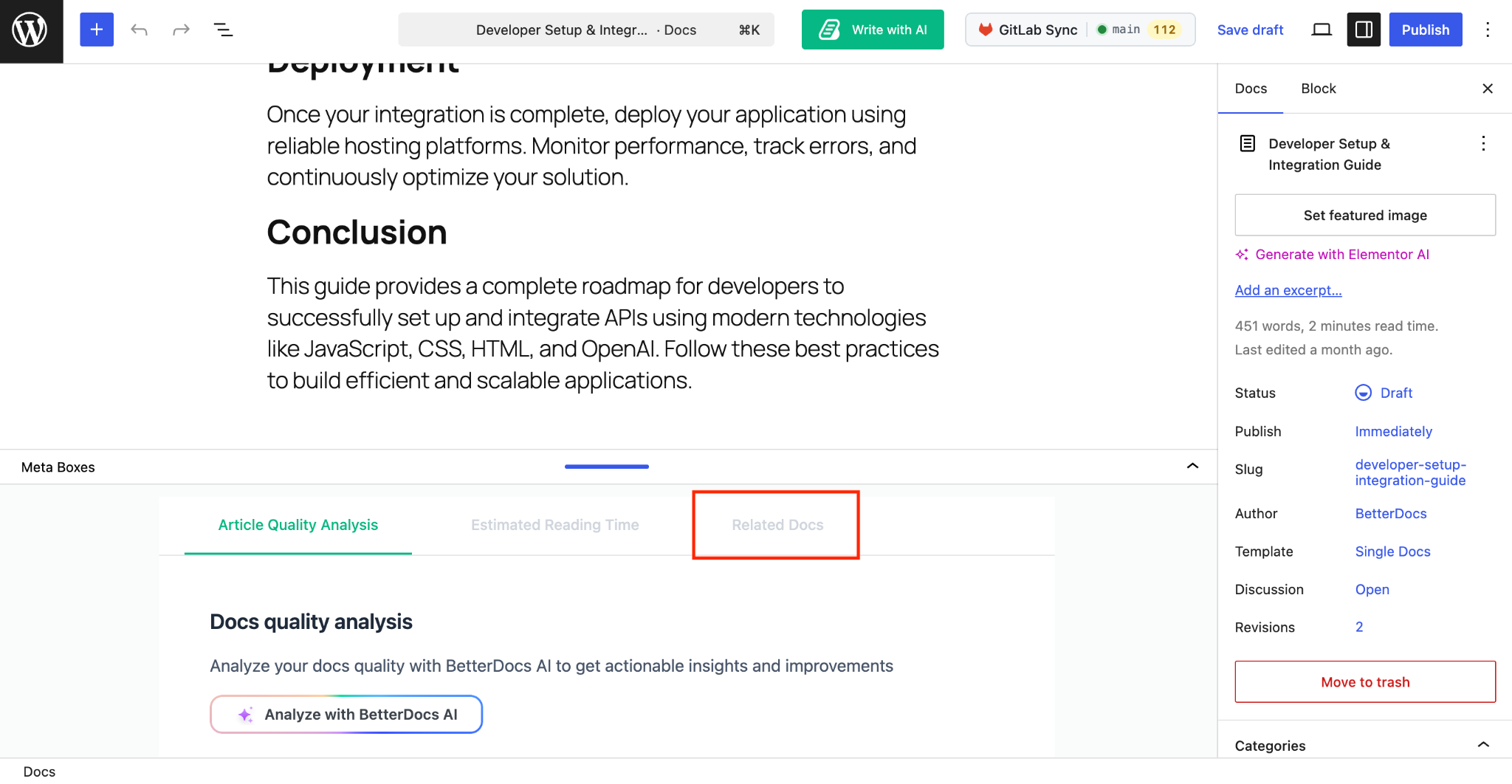
Now, go to the documentation editor. Here, at the bottom of it, you will find a tab for ‘Related Docs’. Go to the tab and here you can configure the AI-related docs for your documentation.
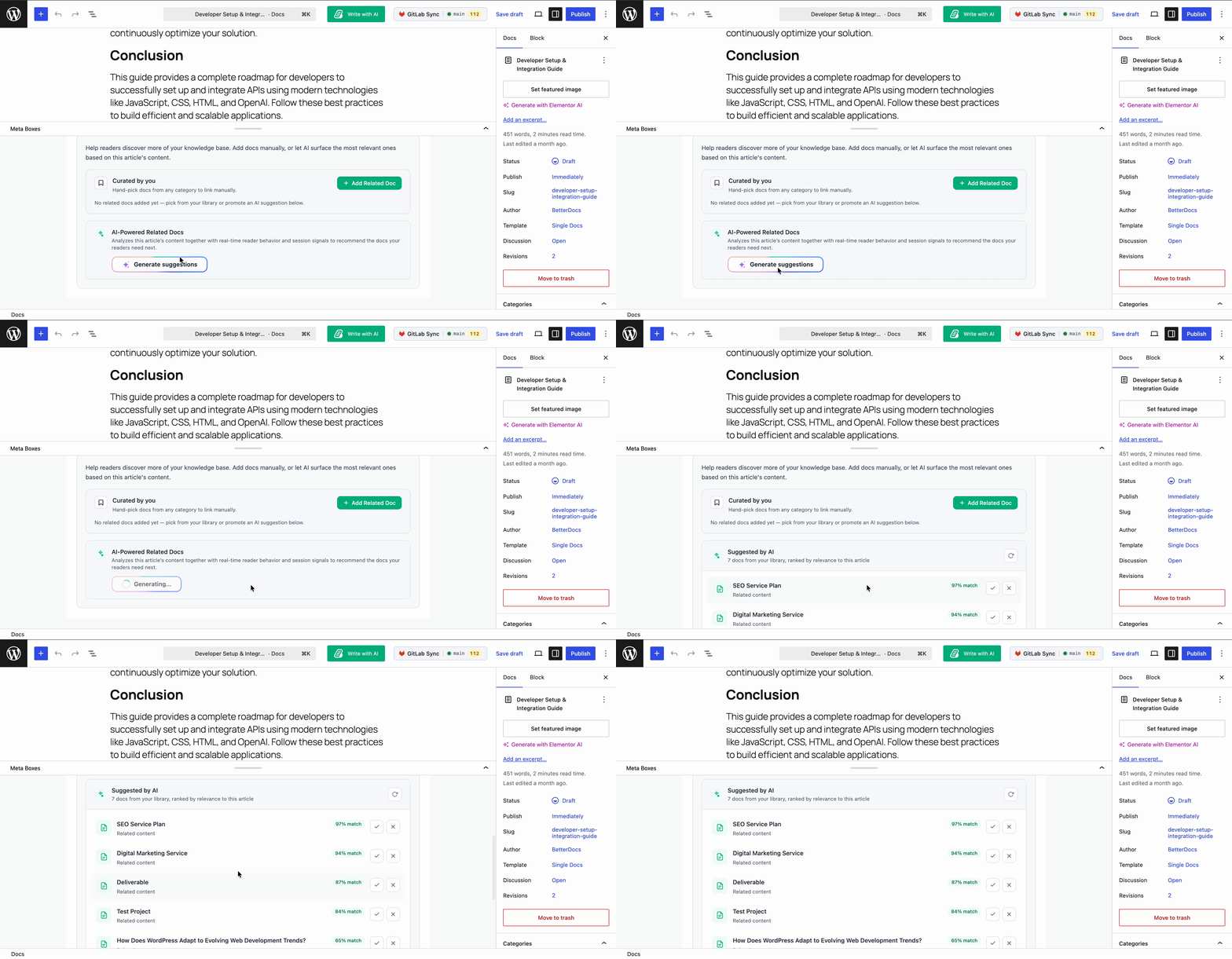
There, you will get two options: one is ‘Curated by you’, where you can manually add the relevant documentation. Another is ‘AI-Powered Related Docs’. Click on the ‘Generate Suggestions’ button and then you will find an AI-generated relevant documentation solution.
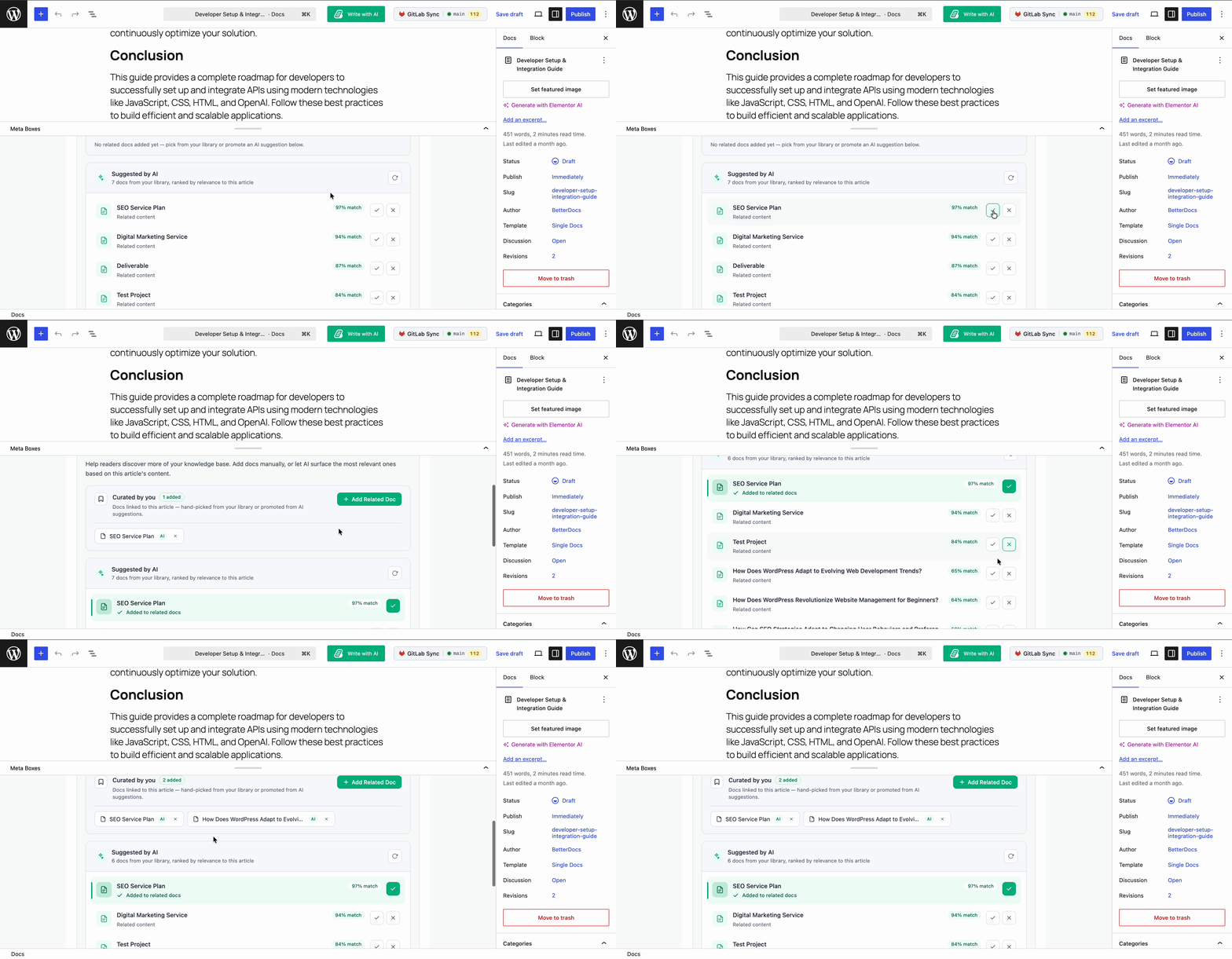
After that, based on the suggestions, a list of documentation will be recommended. Now, if you want to add a document to the relevant documentation, then click on the correct (✓) icon. If you do not want to add the documentation, then add the cross (✗). Based on your preference, users will see the relevant document on the page.
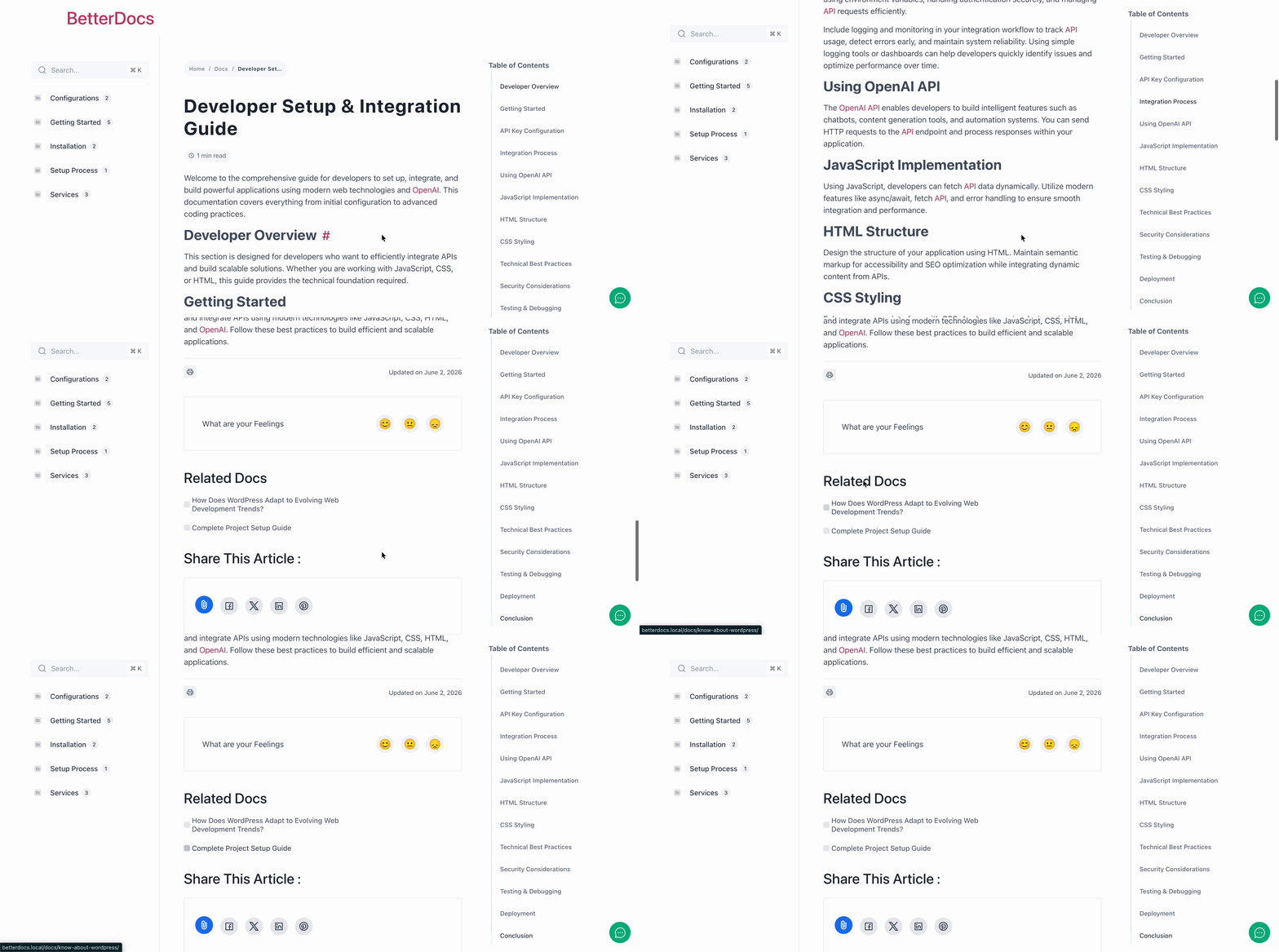
Finally, from the published documentation page, you will see that the relevant documentation appears based on the suggestions of AI.
That is how, with BetterDocs AI-Powered Real-time Related Docs, you can automatically guide your readers to the most relevant articles and create a smarter, more helpful knowledge base for your end-users. For full details, follow this documentation on how to configure AI-Powered Real-time Related Docs in BetterDocs.
Best Practices for Getting the Most Out of AI-Powered Related Docs
Enabling the feature is just the first step. To get the best results, there are several practices that will help the AI deliver more accurate and useful recommendations.
Build a Comprehensive Knowledge Base First
The AI can only recommend articles that exist. If your knowledge base has gaps or if many topics are covered in a single long article rather than broken into focused, individual pages, the recommendation engine has fewer options to work with. Aim for a structure where each article covers one specific topic or task clearly. This gives the AI a richer pool to draw from when matching recommendations to visitor needs.
A general rule of thumb is to write articles that answer one clear question. Instead of one massive troubleshooting guide, consider breaking it into individual articles for each common issue. Not only does this help the AI surface more precise recommendations, but it also improves your SEO since each page can rank for a specific query.
Use Descriptive Titles And Clear Headings
The AI uses the content of your articles, including titles, headings and body text, to understand what each article is about. Descriptive, keyword-rich titles make it significantly easier for the system to match articles to visitor intent. An article titled “How to Reset Your Account Password” will be matched far more accurately than one called “Account Help – Option 3.”
This is also a general SEO best practice that benefits your documentation in search engines as well.
Let the Data Accumulate Before Drawing Conclusions
Like most AI-driven systems, the real-time related docs feature improves as it processes more visitor data. In the first few days after enabling it, the recommendations may not be as refined as they will be after a few weeks of traffic. Give the feature time to learn from real visitor behavior before evaluating its performance.
If your knowledge base receives lower traffic volumes, the learning period may take longer. This is normal. The more behavioral data the AI collects, the more accurate its recommendations become.
Monitor Engagement Metrics After Enabling the Feature
Once the feature is live, keep an eye on a few key metrics to understand whether it is making a difference. Page views per session are one of the most telling indicators. If visitors are clicking through to more articles per visit, the recommendations are working. Bounce rate on documentation pages is another useful signal. A declining bounce rate suggests that visitors are finding the suggestions relevant enough to continue exploring.
You can track these metrics through Google Analytics or any analytics tool you already have connected to your WordPress site. Set a baseline before enabling the feature and check back after 30 to 60 days to see how things have changed.
Who Should Use BetterDocs AI-Powered Related Docs?
This feature is not just for large enterprise teams running extensive documentation portals. It adds genuine value across a wide range of use cases.
- SaaS product teams building in-app help centers benefit because users come to documentation with wildly different levels of experience and specific problems. AI recommendations help bridge that gap by guiding each user toward the articles that match their current point in the product journey.
- WordPress plugin and theme developers who publish documentation for customers can reduce the support requests they receive by helping customers navigate to the right troubleshooting articles automatically.
- eCommerce stores with help centers dealing with questions about shipping, returns, and product usage find that AI-powered docs help customers resolve common questions without emailing support.
- Digital agencies managing documentation sites for multiple clients can deliver a more sophisticated self-service experience without the overhead of manually maintaining related article links across dozens or hundreds of pages.
If your knowledge base has more than a few dozen articles and receives consistent traffic, the AI-powered related docs feature will almost certainly improve your visitors’ experience and reduce your support load.
Frequently Asked Questions
What is BetterDocs AI-Powered Real-Time Related Docs?
How is AI-powered related docs different from manual related articles?
Do I need coding skills to set up this feature in BetterDocs?
How long does it take for the AI to start showing accurate recommendations?
Will AI-powered related docs replace my manually added related articles?
Does BetterDocs AI-Powered Real-Time Related Docs work with all WordPress themes?
Use Real-time Signals to Recommend the Most Relevant Articles Dynamically
Showing the right documentation to the right visitor at the right time is one of the most impactful improvements you can make to your WordPress knowledge base. Static, manually linked related articles served a purpose when knowledge bases were small and traffic was predictable. But as your documentation grows and your audience becomes more diverse, that approach simply does not scale.
BetterDocs AI-Powered Real-time Related Docs closes that gap by bringing intelligent, behavior-driven personalization to your knowledge base. It tracks how visitors actually engage with your content and uses those real-time signals to recommend the most relevant articles dynamically. The result is a smarter knowledge base that helps visitors find answers faster, reduces support ticket volume, and keeps readers engaged longer.
Setting it up takes just a few minutes inside your WordPress dashboard, and the benefits compound over time as the AI learns from your specific audience. If you are serious about improving the self-service experience on your documentation site, this is one of the most practical features you can enable today.
Ready to get started? Visit BetterDocs to explore the plugin and try the AI-Powered Real-time Related Docs feature on your own knowledge base. If you have found this blog helpful, share your opinion with our Facebook community. You can subscribe to our blogs for valuable tutorials, guides, knowledge, tips and the latest WordPress updates.